|
VOOZH | about |
|
VOOZH | about |
Flask is a reliable framework for Python web applications and APIs. It is a well-liked option among developers due to its simplicity and adaptability. But to fully realize its potential, effective instruments are needed. PyCharm shows up as a powerful ally with a ton of capabilities designed specifically for Flask development. Let's explore what PyCharm is, why it's great for Flask development, and how it helps with Flask projects step-by-step.
PyCharm, developed by JetBrains, is an intelligent Python IDE designed to enhance the productivity of Python developers. It offers a wide array of features, including code completion, intelligent code analysis, version control integration, and advanced debugging capabilities. PyCharm is available in two editions: PyCharm Community, which is free and open-source, and PyCharm Professional, which includes additional features for professional developers.
Below, we will create simple project and understand How PyCharm supports Flask.
First, create the virtual environment using the below commands
python -m venv env
.\env\Scripts\activate.ps1
Let's create a small Flask project that fulfills your requirements. First, make sure you have Flask installed. You can install it using:
pip install Flask
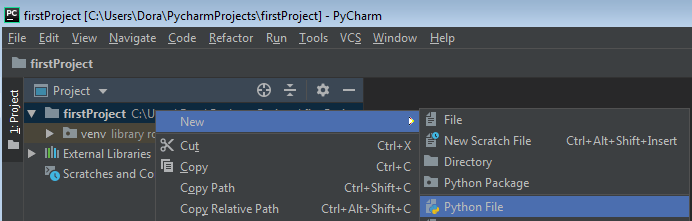
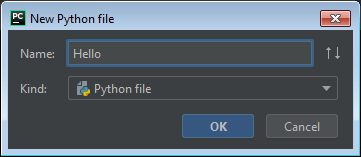
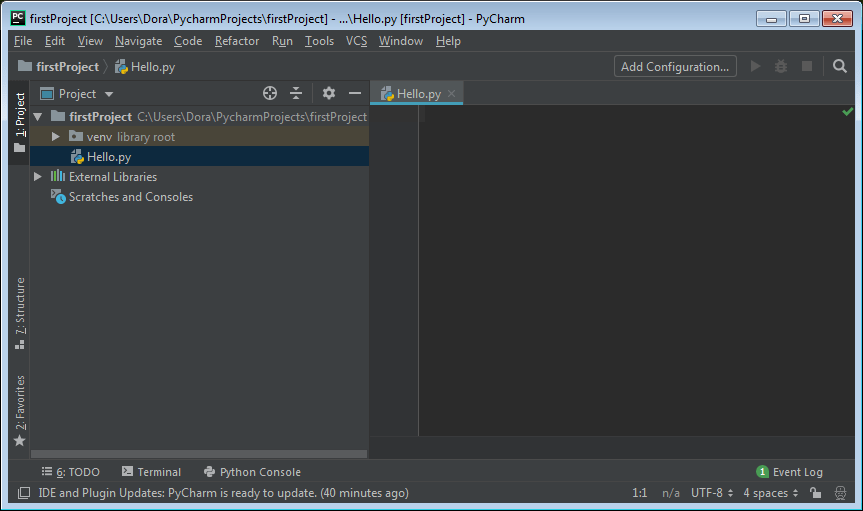
Below are the guide thorugh image fro creating file in PyCharm for Flask .
Click OK and you are ready to code in the PyCharm editor.
Hello.py : Below code defines a Flask web application with two routes. The '/' route renders an 'index.html' template, while the '/visit_geeksforgeeks' route redirects to the GeeksforGeeks website. When the script is run, the Flask app starts in debug mode. The `render_template` function renders HTML templates, and the `redirect` function sends a client to a different URL.
templates/index.html
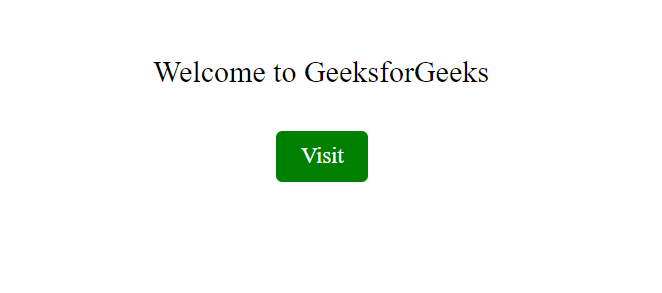
The HTML document defines a page with a centered heading "Welcome to GeeksforGeeks" and a button styled with CSS. The button has a green background, white text, and expands to blue on hover. However, the button is positioned far to the right (margin-left: 700px), which might cause layout issues.