|
VOOZH | about |
|
VOOZH | about |
In this article, we will discuss how to add a new column to PySpark Dataframe.
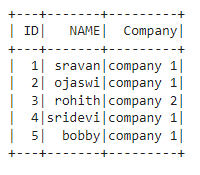
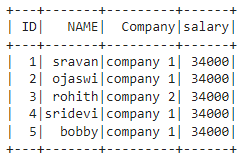
Create the first data frame for demonstration:
Here, we will be creating the sample data frame which we will be used further to demonstrate the approach purpose.
Output:
👁 ImageIn this approach to add a new column with constant values, the user needs to call the lit() function parameter of the withColumn() function and pass the required parameters into these functions. Here, the lit() is available in pyspark.sql. Functions module.
Syntax:
dataframe.withColumn("column_name", lit(value))
where,
Example:
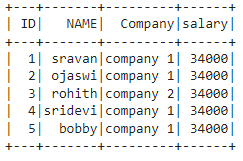
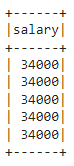
In this example, we add a column named salary with a value of 34000 to the above dataframe using the withColumn() function with the lit() function as its parameter in the python programming language.
Output:
👁 ImageUnder this approach, the user can add a new column based on an existing column in the given dataframe.
Here, under this example, the user needs to specify the existing column using the withColumn() function with the required parameters passed in the python programming language.
Syntax:
dataframe.withColumn("column_name", dataframe.existing_column)
where,
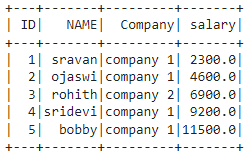
In this example, we are adding a column named salary from the ID column with multiply of 2300 using the withColumn() method in the python language,
Output:
👁 ImageUnder this example, the user has to concat the two existing columns and make them as a new column by importing this method from pyspark.sql.functions module.
Syntax:
dataframe.withColumn("column_name", concat_ws("Separator","existing_column1",'existing_column2'))
where,
Example:
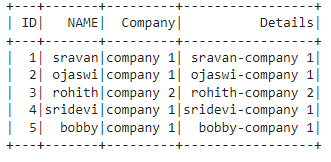
In this example, we add a column named Details from Name and Company columns separated by "-" in the python language.
Output:
👁 ImageIn this method, the user can add a column when it is not existed by adding a column with the lit() function and checking using if the condition.
Syntax:
if 'column_name' not in dataframe.columns:
 dataframe.withColumn("column_name",lit(value))
where,
Example:
In this example, we add a column of the salary to 34000 using the if condition with the withColumn() and the lit() function.
Output:
👁 ImageIn this method, to add a column to a data frame, the user needs to call the select() function to add a column with lit() function and select() method. It will also display the selected columns.
Syntax:
dataframe.select(lit(value).alias("column_name"))
where,
Example:
In this example, we add a salary column with a constant value of 34000 using the select() function with the lit() function as its parameter.
Output:
👁 ImageIn this method, the user has to use SQL expression with SQL function to add a column. Before that, we have to create a temporary view, From that view, we have to add and select columns.
Syntax:
dataframe.createOrReplaceTempView("name")
spark.sql("select 'value' as column_name from view")
where,
Example:
Add new column named salary with 34000 value
Output:
👁 ImageUnder this method, the user needs to use the when function along with withcolumn() method used to check the condition and add the column values based on existing column values. So we have to import when() from pyspark.sql.functions to add a specific column based on the given condition.
Syntax:
dataframe.withColumn("column_name",
when((dataframe.column_name condition1), lit("value1")).
when((dataframe.column_name condition2), lit("value2")).
---------------------
---------------------
when((dataframe.column_name conditionn), lit("value3")).
.otherwise(lit("value")) )
where,
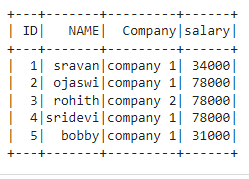
Example:
In this example, we add a new column named salary and add value 34000 when the name is sravan and add value 31000 when the name is ojsawi, or bobby otherwise adds 78000 using the when() and the withColumn() function.