|
VOOZH | about |
|
VOOZH | about |
Metadata, also known as data about the data. Metadata can give us data description, summary, storage in memory, and datatype of that particular data. We are going to display and create metadata.
Scenario:
Steps:
Here, we are going to create a data frame, and we can view and create metadata on the created data frame
View existing Metadata methods:
Create Metadata
We can create the metadata for the particular data frame using dataframe.scale() and dataframe.offset() methods. They are used to represent the metadata.
Syntax:
dataframe_name.scale=value
dataframe_name.offset=value
Below are some examples which depict how to add metadata to a DataFrame or Series:
Example 1
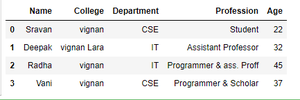
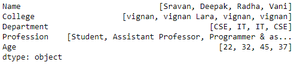
Initially create and display a dataframe.
Output:
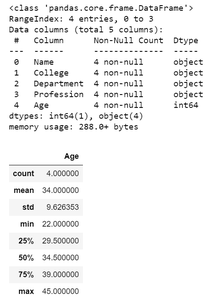
Then check dataframe attributes and description.
Output:
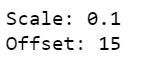
Initialize offset and scale of the dataframe.
Output:
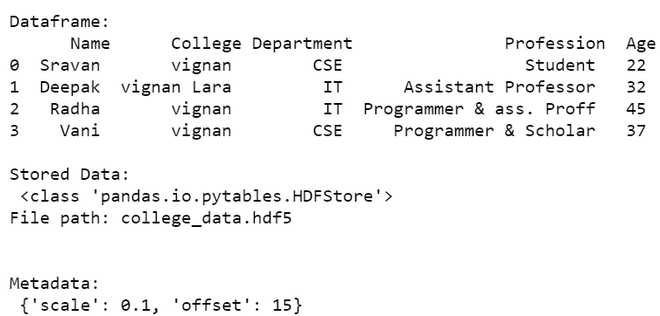
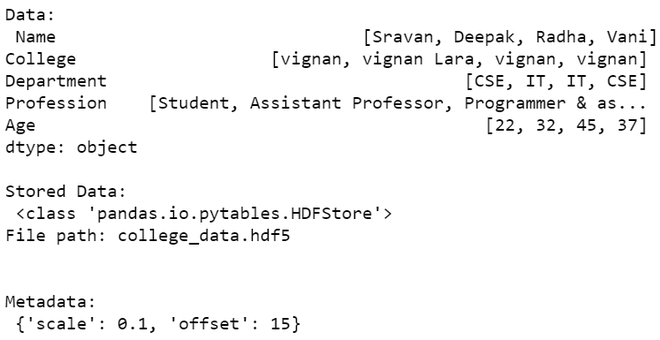
We are storing data in hdf5 file format, and then we will display the dataframe along with its stored metadata.
Output:
Example 2
Series data structure in pandas will not support info and all methods. So we directly create metadata and display.
Output:
Now we will store the metadata and then display it.
Output: