|
VOOZH | about |
|
VOOZH | about |
In this article, we are going to see how to change the column names in the pyspark data frame.
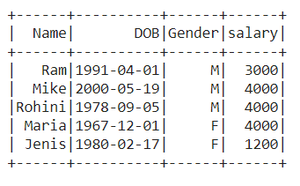
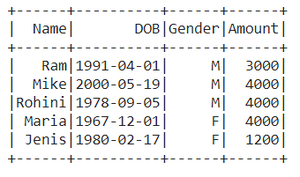
Let's create a Dataframe for demonstration:
Output :
👁 ImageWe will use of withColumnRenamed() method to change the column names of pyspark data frame.
Syntax: DataFrame.withColumnRenamed(existing, new)
Parameters
- existingstr: Existing column name of data frame to rename.
- newstr: New column name.
- Returns type: Returns a data frame by renaming an existing column.
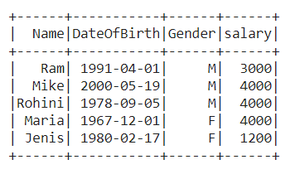
Example 1: Renaming the single column in the data frame
Here we're Renaming the column name 'DOB' to 'DateOfBirth'.
Output :
👁 ImageExample 2: Renaming multiple column names
Output :
👁 ImageRenaming the column names using selectExpr() method
Syntax : DataFrame.selectExpr(expr)
Parameters :
expr : It's an SQL expression.
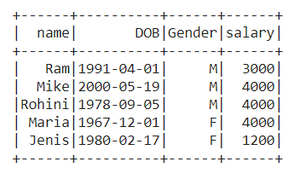
Here we are renaming Name as a name.
Output :
👁 ImageSyntax: DataFrame.select(cols)
Parameters :
cols: List of column names as strings.
Return type: Selects the cols in the dataframe and returns a new DataFrame.
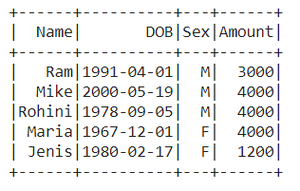
Here we Rename the column name 'salary' to 'Amount'
Output :
👁 ImageThis function returns a new DataFrame that with new specified column names.
Syntax: toDF(*col)
Where, col is a new column name
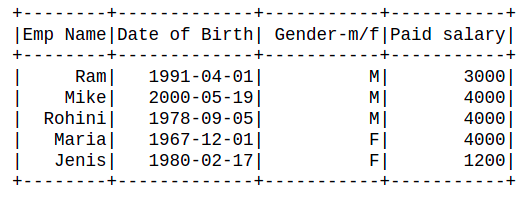
In this example, we will create an order list of new column names and pass it into toDF function