|
VOOZH | about |
|
VOOZH | about |
A pivot table is a statistical table that summarizes a substantial table like a big dataset. It is part of data processing. This summary in pivot tables may include mean, median, sum, or other statistical terms. Pivot tables are originally associated with MS Excel but we can create a pivot table in Pandas using Python using the Pandas Dataframe pivot_table() method.
Let's first create a dataframe that includes Sales of Fruits.
Output
👁 pandas-pivot-1Below are some examples to understand how we can create a pivot table in Pandas in Python:
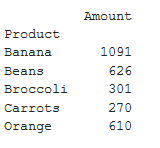
In this example, the DataFrame 'df' is transformed using a pivot table, aggregating the total 'Amount' for each unique 'Product' and displaying the result with the sum of amounts for each product.
Output
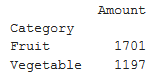
👁 ImageIn this example, a pivot table is created from the DataFrame 'df' to summarize the total 'Amount' sales for each unique 'Category,' employing the 'sum' aggregation function, and the result is printed.
Output
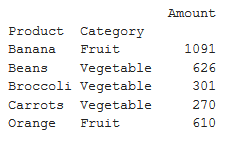
👁 ImageIn this example, a pivot table is generated from the DataFrame 'df' to showcase the total 'Amount' sales for unique combinations of 'Product' and 'Category,' utilizing the 'sum' aggregation function. The resulting pivot table is then printed.
Output
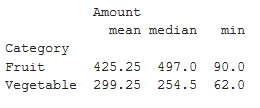
👁 ImageIn this example, a pivot table is created from the DataFrame 'df' to display the median, mean, and minimum 'Amount' values categorized by 'Category.' The aggregation functions 'median,' 'mean,' and 'min' are applied, and the resulting pivot table is printed.
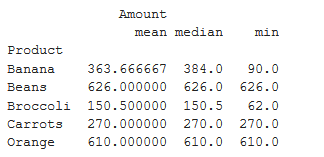
Output
👁 ImageIn this example, a pivot table is generated from the DataFrame 'df' to showcase the median, mean, and minimum 'Amount' values for each unique 'Product.' The aggregation functions 'median,' 'mean,' and 'min' are applied, resulting in the pivot table, which is then printed.