|
VOOZH | about |
|
VOOZH | about |
Python warnings are non-fatal messages that alert the user to potential problems in the code. Unlike exceptions, warnings do not interrupt the execution of the program, but they notify the user that something might not be working as expected. Warnings can be generated by the interpreter or manually by the program.
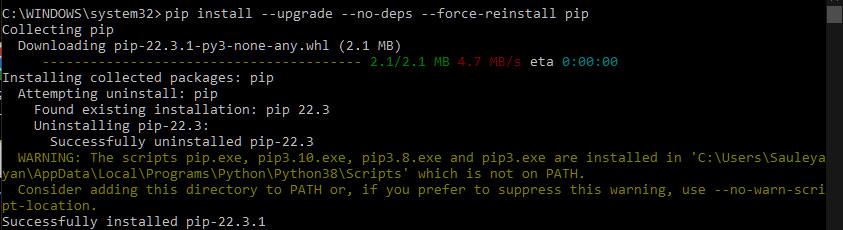
For example, a warning might be raised if the environment is missing some required configuration, like when the PATH variable doesn't include the location of Python’s script directory.
Again, the task of reinstalling pip was completed successfully, but the compiler showed a warning about a problem with the paths. While this didn't affect the task this time, it might cause issues in the future.
Python warnings alert developers to deprecated features or potential issues. Sometimes, you may want to suppress these warnings for cleaner output or specific use cases. There are two primary ways to disable Python warnings.
To disable warnings from within the code, we can use Python's built-in warnings module. By setting up warning filters, we can prevent warnings from being displayed during the execution of the program.
If you want to hide all warnings throughout your program, you can use warnings.filterwarnings('ignore'). This is useful in scenarios where warnings aren't relevant to your current execution and you want a clean output.
Script continues...
Explanation: warnings.filterwarnings('ignore') command suppresses all warnings, so even warnings.warn("This warning will be hidden") won't display. The script continues with "Script continues...", running without interruptions.
Sometimes, you only want to suppress warnings in a specific block of code. Python allows you to do this using a context manager with warnings.catch_warnings().
Before warning
After warning
Explanation: warnings.catch_warnings() context manager temporarily suppresses warnings. Even though warnings.warn("This is hidden") is called, it’s suppressed and the script continues with "After warning" without interruptions.
To disable warnings via command-line arguments, Python provides a way to suppress them without modifying the code. By using command-line flags, you can control whether warnings are displayed or not during the execution of your program.
You can disable all warnings by using the -W "ignore" flag when running the script from the command line. This is especially useful for third-party scripts or when you’re testing a script and don’t want warnings to clutter the output.
Syntax:
python -W "ignore" your_script.py
Here:
Example:
python -W "ignore" test.py
Explanation: This command tells the Python interpreter to suppress all warnings while executing test.py.
Alternatively, you can use the PYTHONWARNINGS environment variable to control warnings globally for the session. This approach is useful when you want to apply the same warning filter for multiple runs or across your system.
set PYTHONWARNINGS=ignore
python your_script.py
export PYTHONWARNINGS=ignore
python your_script.py
This will prevent warnings from being displayed during the execution of your_script.py for that session.