|
VOOZH | about |
|
VOOZH | about |
In PyMongo, the drop_indexes() method is used to remove all non-default indexes from a collection. It helps developers clean up or reset indexing strategies, especially during optimization or testing. The method retains the default _id index, which cannot be dropped.
collection.drop_indexes()
Note: drop_indexes() method does not take any parameters, it simply removes all indexes on the collection.
By default, every MongoDB collection has an index on the _id field to uniquely identify each document. Even if you delete all other indexes, the _id index will still remain and cannot be removed.
To list all current indexes on a collection, run:
👁 python-mongodb-drop-all-indexes-1Where,
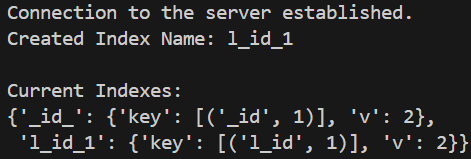
This code creates an index on the l_id field. It then prints the auto-generated name of the new index and displays all indexes present in the collection using index_information().
Output
In this Example all indexes are removed except default _id index using the drop_indexes() method, then prints the remaining indexes using index_information().
Output
Related Articles: