|
VOOZH | about |
|
VOOZH | about |
It is a quite compulsory process to modify the data we have as the computer will show you an error of invalid input as it is quite impossible to process the data having 'NaN' with it and it is not quite practically possible to manually change the 'NaN' to its mean. Therefore, to resolve this problem we process the data and use various functions by which the 'NaN' is removed from our data and is replaced with the particular mean and ready to be processed by the system.
Below are the ways by which we can fill NAN values with mean in Pandas in Python:
With the help of Dataframe.fillna() from the pandas' library, we can easily replace the ‘NaN’ in the data frame.
Example 1:Handling Missing Values Using Mean Imputation
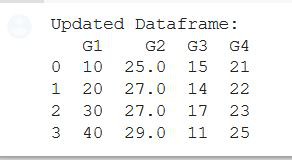
In this example, a Pandas DataFrame, 'gfg,' is created from a dictionary ('GFG_dict') with NaN values in the 'G2' column. The code computes the mean of the 'G2' column and replaces the NaN values in that column with the calculated mean, resulting in an updated DataFrame.
Output:
👁 ImageExample 2: Filling Mean in NAN Values using Dataframe.fillna()
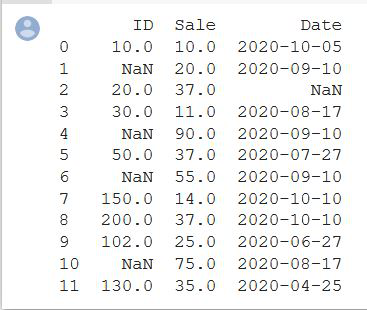
In this example, a Pandas DataFrame, 'df,' is created with missing values in the 'Sale' column. The code replaces the NaN values in the 'Sale' column with the integer mean of available values, producing an updated DataFrame with filled missing values.
Output:
👁 ImageThis function Imputation transformer for completing missing values which provide basic strategies for imputing missing values. These values can be imputed with a provided constant value or using the statistics (mean, median, or most frequent) of each column in which the missing values are located. This class also allows for different missing value encoding.
Syntax: class sklearn.impute.SimpleImputer(*, missing_values=nan, strategy='mean', fill_value=None, verbose=0, copy=True, add_indicator=False)[source][/source]
Parameters:
- missing_values: int float, str, np.nan or None, default=np.nan
- strategy string: default=’mean’
- fill_valuestring or numerical value: default=None
- verbose: integer, default=0
- copy: boolean, default=True
- add_indicator: boolean, default=False
👁 Image
Example 1: Computation on PID column
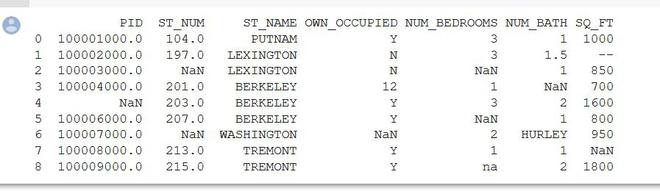
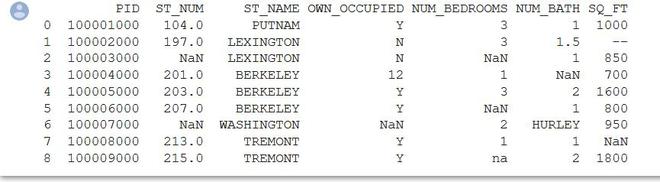
In this example, a property dataset is loaded from a CSV file using Pandas. The code focuses on a specific column (presumably the first column based on iloc[:, 0]) denoted as 'X.' The SimpleImputer from scikit-learn is employed to replace missing values (NaN) in 'X' with the mean of the available values, and the updated 'X' is printed.
Output:
👁 ImageExample 2: Computation on ST_NUM Column
In this example, a property dataset is loaded from a CSV file using Pandas. The code focuses on the second column (index 1) denoted as 'X.' The SimpleImputer from scikit-learn is employed to replace missing values (NaN) in 'X' with the mean of the available values.