|
VOOZH | about |
|
VOOZH | about |
While analyzing the real datasets which are often very huge in size, we might need to get the pandas column names in order to perform certain operations. The simplest way to get column names in Pandas is by using the .columns attribute of a DataFrame. Let's understand with a quick example:
Index(['Name', 'Team', 'Number'], dtype='object')
This returns an Index object containing all the column names. If you need the column names as a list, you can convert this Index object using the tolist() method or Python's built-in list() function.
Output:
['Name', 'Team', 'Number']In this article, we’ll dive deeper into different methods to access column names and discuss their use cases. Additionally, we’ll expand the DataFrame size to reflect real-world scenarios better.
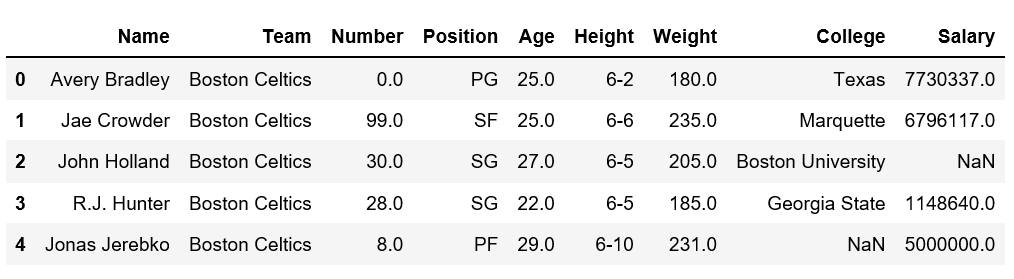
To demonstrate these methods clearly, we'll use an NBA player statistics dataset. It contains columns like player names, team, age, college, and salary.
Output:
You can access this dataset directly from this link: NBA Dataset on GeeksforGeeks. It includes information about players, such as their names, teams, positions, ages, heights, weights, colleges, and salaries. Now let’s try to get the columns name from above dataset.
We can use the Pandas DataFrame .columns property to get all column names as an Index object. To convert it into a list.
Output:
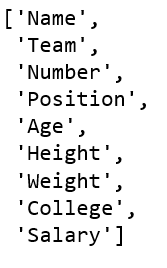
If you prefer working with a Python list instead of an Index object, you can convert it using .tolist():
Output:
['Name', 'Team', 'Number', 'Position', 'Age', 'Height', 'Weight', 'College', 'Salary']The .keys() method behaves similarly to .columns and returns an Index object containing the column names.
Output:
Index(['Name', 'Team', 'Number', 'Position', 'Age', 'Height', 'Weight',
 'College', 'Salary'],
 dtype='object')
If you need the column names as a NumPy array, you can access them through .columns.values. This can be particularly useful when working with NumPy functions that expect arrays.
Output :
['Name' 'Team' 'Number' 'Position' 'Age' 'Height' 'Weight' 'College',' Salary']If you want the column names in alphabetical order, you can use Python’s built-in sorted() function.
Output :
['Age', 'College', 'Height', 'Name', 'Number', 'Position', 'Salary', 'Team', 'Weight']Sometimes, you may want to iterate over the column names for tasks like renaming or applying functions to each column. This approach allows to perform operations on each column name individually.
Output:
Name
Team
Number
Position
Age
Height
Weight
College
Salary