|
VOOZH | about |
|
VOOZH | about |
In this article, we are going to learn how to get the number of elements in a partition using Pyspark in Python.
Are you a data enthusiast who has ever worked on a Pyspark data frame? Then, you might surely know that whenever we upload any file in the Pyspark, it creates a partition of that data equal to the number of cores. You can repartition that data and divide it into as many partitions according to your wish. Thus, after partitioning, if you want to know how many elements exist in every RDD dataframe partition, you can achieve it using the function of the Pyspark module. In this article, we will discuss the same.
Note: In the article about installing Pyspark we have to install python instead of scala rest of the steps are the same.
Pyspark: An open source, distributed computing framework and set of libraries for real-time, large-scale data processing API primarily developed for Apache Spark, is known as Pyspark. You can install the following module through the following command in Python:
pip install pyspark
In this method, we are going to make the use of spark_partition_id() function to get the number of elements of the partition in a data frame.
Step 1: First of all, import the required libraries, i.e. SparkSession, and spark_partition_id. The SparkSession library is used to create the session while spark_partition_id is used to get the record count per partition.
from pyspark.sql import SparkSession
from pyspark.sql.functions import spark_partition_id
Step 2: Now, create a spark session using the getOrCreate function.
spark_session = SparkSession.builder.getOrCreate()
Step 3: Then, read the CSV file for which you want to check the number of elements in the partition.
data_frame=csv_file = spark_session.read.csv('#Path of CSV file', sep = ',', inferSchema = True, header = True)
Step 4: Finally, get the number of elements of partition using the spark_partition_id function.
data_frame.withColumn("partitionId",spark_partition_id()).groupBy("partitionId").count().show()
Example 1:
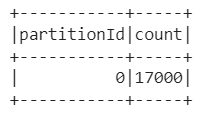
In this example, we have read the CSV file (link) and obtained the number of partitions as well as the number of elements per partition using the spark_partition_id function.
Output:
Example 2:
In this example, we have read the CSV file (link) and obtained the number of partitions as well as the number of elements per partition using the spark_partition_id function. Further, we have repartitioned that data and again get the number of partitions as well as the record count per transition of the new partitioned data.
Output:
When we get the number of elements in the partition before repartitioning, we got the following output:
When we get the number of elements in the partition after repartitioning, we got the following output:
In this method, we are going to make the use of map() function with glom() function to get the number of elements of the partition in a data frame.
Step 1: First of all, import the required libraries, i.e. SparkSession. The SparkSession library is used to create the session.
from pyspark.sql import SparkSession
Step 2: Now, create a spark session using the getOrCreate function.
spark_session = SparkSession.builder.getOrCreate()
Step 3: Later on, create the Spark Context Session.
sc = spark_session.sparkContext
Step 4: Then, read the CSV file of which we want to know the number of partitions or enter the dataset with the number of partitions you want to do of that dataset.
data_frame=csv_file = spark_session.read.csv('#Path of CSV file', sep = ',', inferSchema = True, header = True)or
num_partitions = Declare_number_of_partitions_to_be_done
data_frame = sc.parallelize(Declare_the_dataset, num_partitions)
Step 5: Further, get the length of each partition of the data frame using glom and map function and using collect() to retrieve data.
l = data_frame.glom().map(len).collect()
Step 6: Finally, print the length of each partition obtained in the previous step.
print(l)
Example:
In this example, we have declared a dataset and the number of partitions to be done on it. Then, we applied the glom and map function on the data set and obtained the number of elements in the partition.