|
VOOZH | about |
|
VOOZH | about |
To run Python programs, we need an interpreter. While online tools are available, offline interpreters are better for serious development.
PyCharm, developed by JetBrains, is one of the most widely used Python IDEs. It offers:
PyCharm helps streamline Python development with productivity-focused features.
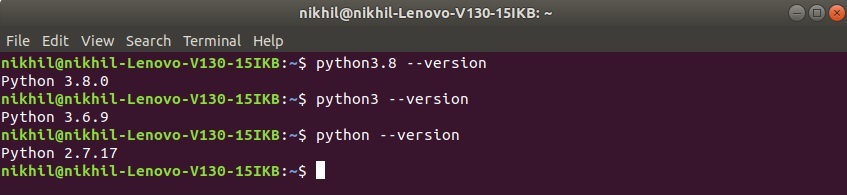
Most of the Linux OS has Python pre-installed. To check if your device is pre-installed with Python or not, follow these steps:
Open the terminal (Ctrl + Alt + T)python --version
If Python is already installed, it will generate a message with the Python version available.
👁 Check-python-version-for-linuxIf Python is not present, go through: How to install Python on Linux?
Go to JetBrains’ official website and download the tar.gz package for PyCharm Community Edition or Professional Edition.
Once downloaded:👁 Image
Download the PyCharm and follow the further instructions for its Setup.
👁 Command to Start PyCharm./pycharm.sh