|
VOOZH | about |
|
VOOZH | about |
Ajax (Asynchronous JavaScript and XML) enables web applications to send and receive data asynchronously. This allows parts of a web page to update without a full reload, creating dynamic and responsive interactions in Django applications.
Using Ajax improves responsiveness and enhances user experience by updating only the necessary parts of a web page.
django-admin startproject myproject
cd myproject
python manage.py startapp myapp
Add the app to settings.py in the project folder:
Run initial migrations:
python manage.py migrate
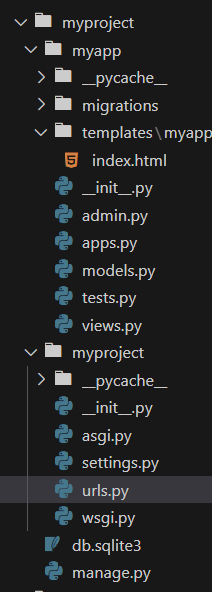
Create a basic template and view to demonstrate Ajax functionality.
1. Create a View in views.py:
2. Create a Template in templates/myapp/index.html:
3. Add URL Patterns in urls.py:
python manage.py runserver
Visit http://127.0.0.1:8000/ in the browser to see a simple form. Enter a name and click Submit. The form sends data to the server and displays the response below the form in real time, without reloading the page.