|
VOOZH | about |
|
VOOZH | about |
In this article, we will discuss how to split a dataset using scikit-learns' train_test_split().
The train_test_split() method is used to split our data into train and test sets. First, we need to divide our data into features (X) and labels (y). The dataframe gets divided into X_train, X_test, y_train, and y_test. X_train and y_train sets are used for training and fitting the model. The X_test and y_test sets are used for testing the model if it's predicting the right outputs/labels. we can explicitly test the size of the train and test sets. It is suggested to keep our train sets larger than the test sets.
Syntax: sklearn.model_selection.train_test_split(*arrays, test_size=None, train_size=None, random_state=None, shuffle=True, stratify=None
Parameters:
- *arrays: sequence of indexables. Lists, numpy arrays, scipy-sparse matrices, and pandas dataframes are all valid inputs.
- test_size: int or float, by default None. If float, it should be between 0.0 and 1.0 and represent the percentage of the dataset to test split. If int is used, it refers to the total number of test samples. If the value is None, the complement of the train size is used. It will be set to 0.25 if train size is also None.
- train_size: int or float, by default None.
- random_state : int,by default None. Controls how the data is shuffled before the split is implemented. For repeatable output across several function calls, pass an int.
- shuffle: boolean object , by default True. Whether or not the data should be shuffled before splitting. Stratify must be None if shuffle=False.
- stratify: array-like object , by default it is None. If None is selected, the data is stratified using these as class labels.
Returns:
splitting: The train-test split of inputs is represented as a list.
In this step, we are importing the necessary packages or modules into the working python environment.
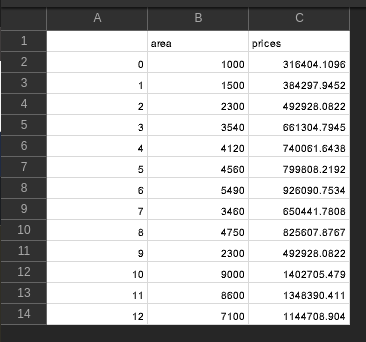
Here, we load the CSV using pd.read_csv() method from pandas and get the shape of the data set using the shape() function.
CSV Used:
Output:
(13, 3)
Here, we are assigning the X and the Y variable in which the X feature variable has independent variables and the y feature variable has a dependent variable.
Here, the train_test_split() class from sklearn.model_selection is used to split our data into train and test sets where feature variables are given as input in the method. test_size determines the portion of the data which will go into test sets and a random state is used for data reproducibility.
Example:
In this example, 'predictions.csv' file is imported. df.shape attribute is used to retrieve the shape of the data frame. The shape of the dataframe is (13,3). The features columns are taken in the X variable and the outcome column is taken in the y variable. X and y variables are passed in the train_test_split() method to split the data frame into train and test sets. The random state parameter is used for data reproducibility. test_size is given as 0.25 which means 25% of the data goes into the test sets. 4 out of 13 rows in the dataframe go into the test sets. 75% of data goes into the train sets, which is 9 rows out of 13 rows. The train sets are used to fit and train the machine learning model. The test sets are used for evaluation.
CSV Used:
Output:
(13, 3)
Head of the dataframe :
 Unnamed: 0 area prices
0 0 1000 316404.109589
1 1 1500 384297.945205
2 2 2300 492928.082192
3 3 3540 661304.794521
4 4 4120 740061.643836
Index(['Unnamed: 0', 'area', 'prices'], dtype='object')
X_train :
3 3540
7 3460
4 4120
0 1000
8 4750
Name: area, dtype: int64
(9,)

X_test :
12 7100
2 2300
11 8600
10 9000
Name: area, dtype: int64
(4,)

y_train :
3 661304.794521
7 650441.780822
4 740061.643836
0 316404.109589
8 825607.876712
Name: prices, dtype: float64
(9,)

y_test :
12 1.144709e+06
2 4.929281e+05
11 1.348390e+06
10 1.402705e+06
Name: prices, dtype: float64
(4,)
Example:
In this example the following steps are executed :
To view and download the CSV file used in this example, click here.
Output:
array([19.82000933, 14.23636718, 12.80417236, 7.75461569, 8.31672266,
15.4001915 , 11.6590983 , 15.22650923, 15.53524916, 19.46415132,
17.21364106, 16.69603229, 16.46449309, 10.15345178, 13.44695953,
24.71946196, 18.67190453, 15.85505154, 14.45450049, 9.91684409,
10.41647177, 4.61335238, 17.41531451, 17.31014955, 21.72288151,
5.87934089, 11.29101265, 17.88733657, 21.04225992, 12.32251227,
14.4099317 , 15.05829814, 10.2105313 , 7.28532072, 12.66133397,
23.25847491, 18.87101505, 4.55545854, 19.79603707, 9.21203026,
10.24668718, 8.96989469, 13.33515217, 20.69532628, 12.17013119,
21.69572633, 16.7346457 , 22.16358256, 5.34163764, 20.43470231,
7.58252563, 23.38775769, 10.2270323 , 12.33473902, 24.10480458,
9.88919804, 21.7781076 ])
2.7506859249500466
Example:
In this example, we're gonna use the K-nearest neighbors classifier model.
In this example the following steps are executed :
Output:
[1 0 2 1 1 0 1 2 1 1 2 0 0 0 0 1 2 1 1 2 0 2 0 2 2 2 2 2 0 0]