|
VOOZH | about |
|
VOOZH | about |
Importing data from text files into NumPy arrays is a common task in data analysis and scientific computing. NumPy provides useful functions that allow you to efficiently read structured text data and convert it into arrays for fast numerical operations. Among these loadtxt() and genfromtxt() are the most widely used methods.
numpy.loadtxt() is a fast and efficient way to load numerical or structured data from text files into NumPy arrays. It works best with clean, consistently formatted datasets such as CSV, TSV or space-separated files. Compared to manual file handling it enables reading entire files in a single line of code.
Syntax: numpy.loadtxt(fname, delimiter=None, dtype=float, skiprows=0, usecols=None, comments='#', max_rows=None)
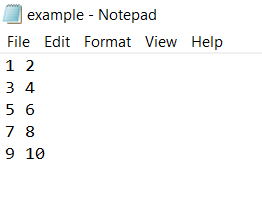
numpy.loadtxt() reads data from a text file and stores it directly in a NumPy array. By specifying dtype=int, all values are converted into integers, making the approach concise, efficient, and suitable for clean numerical datasets.
Output:
Loaded Data:
[[ 1 2]
[ 3 4]
[ 5 6]
[ 7 8]
[ 9 10]]
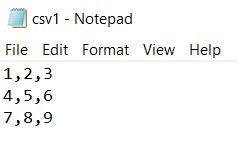
When working with CSV files values are separated by commas instead of spaces. The delimiter parameter in numpy.loadtxt() allows NumPy to correctly interpret and split each value making it easy to load CSV data directly into an array.
Output:
CSV Data:
[[1. 2. 3.]
[4. 5. 6.]
[7. 8. 9.]]
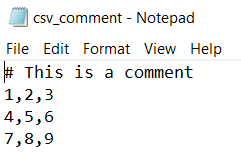
Some text or CSV files include comment lines or metadata that should not be treated as data. The comments parameter in numpy.loadtxt() allows you to skip such lines while loading the numerical data into a NumPy array.
Output:
Data without comments:
[[1. 2. 3.]
[4. 5. 6.]
[7. 8. 9.]]
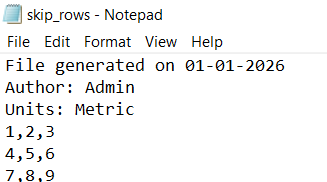
Some text or CSV files include metadata at the top that should not be treated as data. The skiprows parameter in numpy.loadtxt() allows you to skip these rows and start reading from the actual data.
Output:
Data after skipping metadata:
[[1. 2. 3.]
[4. 5. 6.]
[7. 8. 9.]]
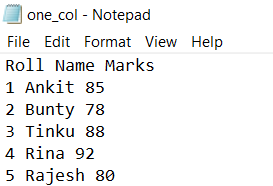
When working with structured data you may only need specific columns. The usecols parameter in numpy.loadtxt() allows you to select one or more columns while skipping headers with skiprows.
Output:
Ankit
Bunty
Tinku
Rina
Rajesh
numpy.genfromtxt() is a flexible alternative to loadtxt(), capable of handling missing values, mixed data types, and irregular file formats. It’s ideal for real-world datasets that may be incomplete or inconsistent.
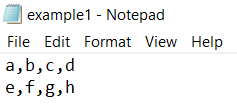
The numpy.genfromtxt() function can read structured text files while handling different data types and encodings, making it ideal for textual or categorical data.
Output:
[['a' 'b' 'c' 'd']
['e' 'f' 'g' 'h']]
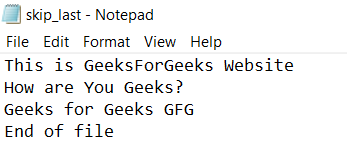
numpy.genfromtxt() allows skipping lines at the end of a file using the skip_footer parameter, which is useful when files contain summaries, footers, or extra notes.
Output:
[['This' 'is' 'GeeksForGeeks' 'Website']
['How' 'are' 'You' 'Geeks?']
['Geeks' 'for' 'Geeks' 'GFG']]
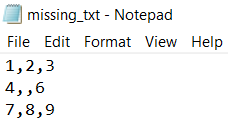
numpy.genfromtxt() can automatically handle missing values in datasets replacing them with NaN to allow safe numerical processing. This makes it more robust than loadtxt() for real-world, incomplete data.
Output:
[[ 1. 2. 3.]
[ 4. nan 6.]
[ 7. 8. 9.]]
numpy.genfromtxt() lets you replace missing values with a custom default using the filling_values parameter. This is useful when missing data could affect calculations or modeling.