VOOZH about

URL: https://www.geeksforgeeks.org/python/indentation-in-python/

⇱ Indentation in Python - GeeksforGeeks


  • Courses
  • Tutorials
  • Interview Prep

Indentation in Python

Last Updated : 27 May, 2026

Indentation is used to organise and group statements into blocks of code. Unlike many other programming languages, Python uses indentation instead of braces {} to define code structure.

  • Statements with the same indentation belong to the same block of code.
  • Indentation is created using spaces or tabs, but four spaces are commonly preferred.
  • Inconsistent indentation causes an IndentationError.

Output

ERROR!
Traceback (most recent call last):
File "<main.py>", line 2
print("I have tab Indentation ")
IndentationError: unexpected indent

Explanation:

  • First print statement has no indentation, so it is correctly executed.
  • Second print statement has tab indentation, but it doesn't belong to a new block of code, that's why it throws IndentationError.

Indentation in Conditional Statements

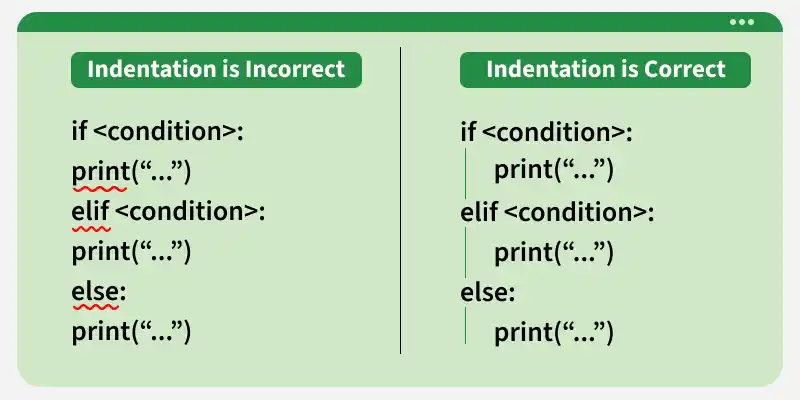
All statements in a conditional block should have same alignment.

👁 indentation_in_python
Indentation in Python

The code below demonstrate how we use indentation to define seperate scopes of if-else statements:


Output
GeeksforGeeks...
All set !

Explanation:

  • Statements inside if and else are indented, which makes them part of their respective blocks.
  • Since a is greater than or equal to 18, the if block executes.
  • The last print() statement is outside the if-else block, so it runs every time.

Indentation in Loops

Indentation defines the set of statements that are executed repeatedly inside a loop.


Output
1
2
3
4
5

Explanation: Both print(j) and j = j + 1 are indented, so they are part of the loop block. These statements keep executing until the condition j <= 5 becomes False.

Comment
Article Tags:
Article Tags: