|
VOOZH | about |
|
VOOZH | about |
The yfinance API is a powerful tool for accessing financial data from Yahoo Finance. It allows users to download historical market data, retrieve financial information, and perform various financial analyses. This API is widely used in finance, investment, and trading applications for its ease of use and comprehensive data coverage. In this article, we will explore the installation process of yfinance with Anaconda and see a code example using Python.
Before installing yfincance, ensure you have Conda installed on your system. Conda is a powerful package manager and environment management system that simplifies the installation and management of software packages and dependencies.
Once you are done setting up Conda on your system, follow these steps to install yfinance.
Click on the Start menu, search for Anaconda Prompt, and open it. This terminal allows you to manage Conda environments and packages.
In the Anaconda Prompt, type the following command and press Enter. This command creates a new Conda environment named yfinance-env for isolating dependencies.
conda create --name yfinance-env Activating the environment ensures that packages installed are isolated within this environment.
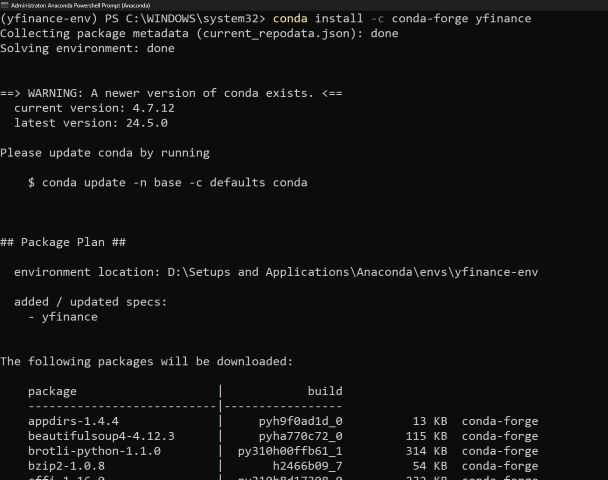
conda activate yfinance-envWith the environment activated, type this command and press Enter. This installs yfinance and its dependencies from the conda-forge channel.
conda install -c conda-forge yfinanceTo verify that yfinance has been installed correctly using Conda, you can check the package information directly in the Conda environment.
To get detailed information about the yfinance package, use the following command. This will display details such as the version number and the build string, confirming that the package is present and correctly installed.
conda list yfinanceNow that we have successfully installed and verified yfinance in Anaconda, let us see an example how we can use it in our code.
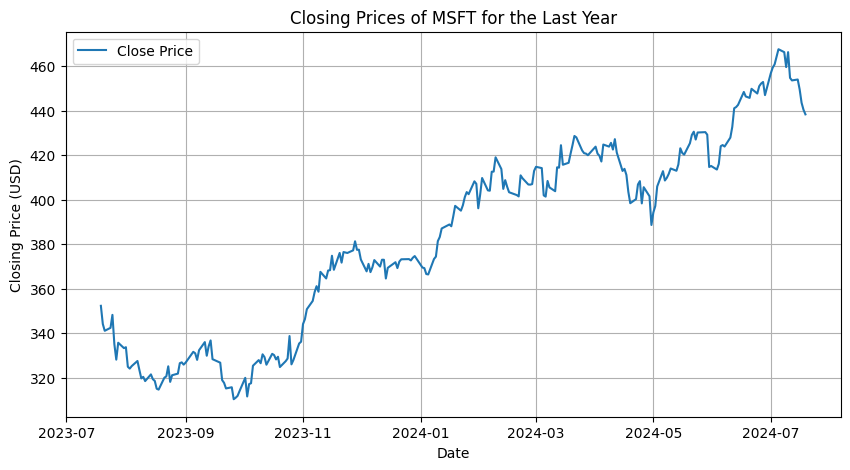
In this example, we are using the yfinance library to fetch historical stock prices for the ticker symbol 'MSFT' (Microsoft) over the past year. The script then plots the closing prices using Matplotlib, handling any errors that may occur during the data fetching process.
Output:
In conclusion, using yfinance with Conda simplifies the installation process and ensures proper management of dependencies. By following the steps to set up Conda, create an isolated environment, and install yfinance, you can efficiently fetch and analyze historical stock data. This approach ensures a streamlined and error-free workflow for financial data analysis.