|
VOOZH | about |
|
VOOZH | about |
PyQtGraph is a graphics and user interface library for Python that provides functionality commonly required in designing and science applications. Its primary goals are to provide fast, interactive graphics for displaying data (plots, video, etc.) and second is to provide tools to aid in rapid application development (for example, property trees such as used in Qt Designer).
PyQtGraph makes heavy use of the Qt GUI platform (via PyQt or PySide) for its high-performance graphics and numpy for heavy number crunching. In particular, pyqtgraph uses Qt’s GraphicsView framework which is a highly capable graphics system on its own, this brings optimized and simplified primitives to this framework to allow data visualization with minimal effort.
In order to install the PyQtGraph we use the command given below
pip install pyqtgraph
Requirements: PyQtGraph can run on any platform which supports the following packages:
1. Python 2.7 and 3+
2. PyQt 4.8+ or PySide
3. NumPy
4. python-opengl bindings are required for 3D graphics
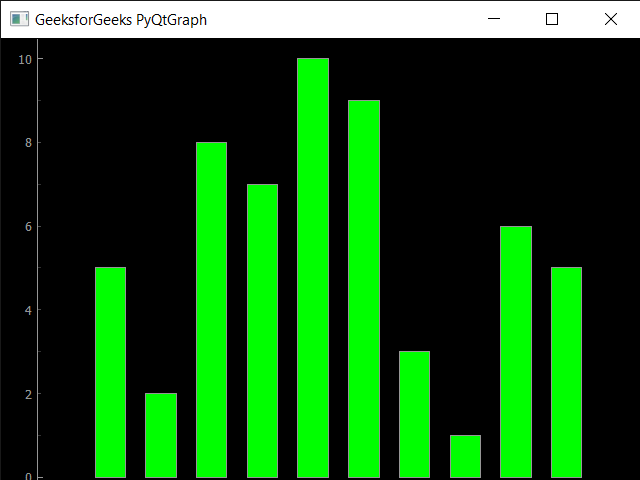
Example : In this example we will create a simple bar graph using PyQtGraph module in python
Output :
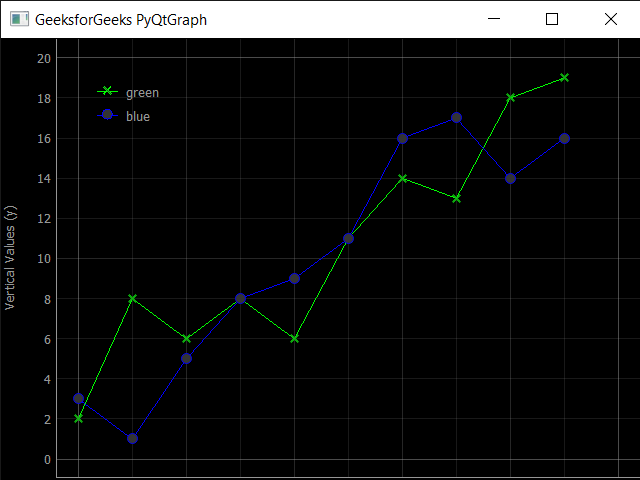
Example : In this we will plot two lines together in same graph, below is the implementation
Output :
Things PyQtGraph can perform :
1. Basic data visualization like images, line and scatter plots
2. Fast enough to plot realtime update of video / data
3. Interactive scaling/panning, averaging, FFTs, SVG/PNG export
4. Widgets for marking & selecting plot regions
5. Automatic slicing of multi-dimensional image data
6. Framework for building customized image region-of-interest widgets
7. Docking system that replaces/complements Qt’s dock system to allow more complex (and more predictable) docking arrangements
8. ParameterTree widget for rapid prototyping of dynamic interfaces