|
VOOZH | about |
|
VOOZH | about |
In Python, when it comes to terminal output, the default experience can be somewhat monotonous—text is usually displayed in a single color, which can make it challenging to distinguish between different types of output. This is where Colorama comes into play.
Colorama is a Python library that simplifies the process of adding colored text and styling to terminal output. It’s particularly useful when we want to make our console applications more visually appealing or when we need to highlight certain parts of our output for better readability.
In this article, we will explore the basics of Colorama, how to install it, and how to use it to enhance your terminal output. We will cover:
Table of Content
Colorama is a Python module that simplifies the process of adding color to text in the terminal. It allows you to style your outputs with colors, bold text, and more. It's cross-platform, meaning it works seamlessly on Windows, macOS, and Linux. The module handles the complexities of making sure colors work correctly on different operating systems, allowing us to focus on creating colorful outputs.
The colorama library is not included in the standard Python library and needs to be installed separately by using the following command in our command prompt or terminal window.
pip install colorama# orconda install -c anaconda colorama
Once installed, we can import it into our Python script:
Before we start using colorama, it’s good practice to initialize it to ensure compatibility across different platforms:
colorama.init()
#orfrom colorama import initinit()
Now let us see a few different examples for a better understanding of how the Colorama Module works in Python.
The primary feature of Colorama is the ability to change the color of the text displayed in the terminal. Here are simple examples:
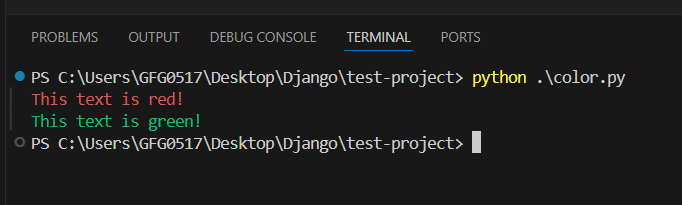
Example 1 - In this example:
Fore.RED changes the text color to red.Fore.GREEN changes the text color to green.Output
We can chain multiple colors and styles together to create more complex outputs.
Example 2 - In this example:
Output
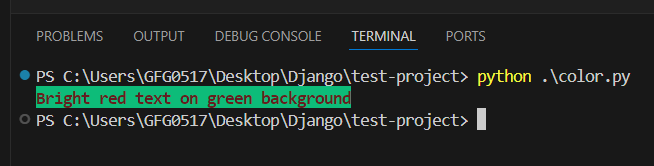
Colorama provides options to change both the foreground (text) and background colors. The available colors are:
BLACK, RED, GREEN, YELLOW, BLUE, MAGENTA, CYAN, WHITEBLACK, RED, GREEN, YELLOW, BLUE, MAGENTA, CYAN, WHITEHere’s how we can set foreground and background colors and styles
Output
In this example:
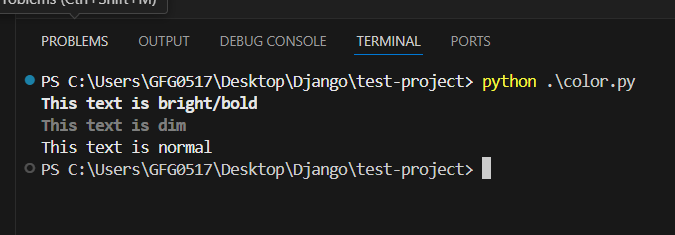
Fore.RED sets the text color to red.Back.GREEN sets the background color to green.Colorama also supports various text styles, such as making the text bold, dim, or normal. The available styles are:
Style.NORMALStyle.BRIGHTStyle.DIMHere’s an example:
Output
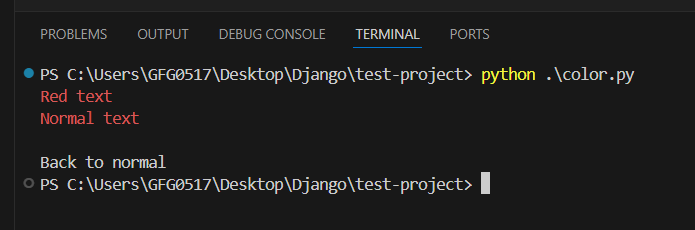
After applying a style, it's a good practice to reset the styles using Style.RESET_ALL. This ensures that any subsequent text is displayed normally, without unintended color or styling.
Output
Colorama can be combined with other Python libraries to create more sophisticated applications. Here are a few advanced use cases:
This code creates a simple progress bar that updates in the terminal, with the progress percentage displayed in bright cyan.
Output
Colorama is a powerful and easy-to-use library that can greatly enhance the aesthetics and readability of terminal output in Python applications. By enabling colored text and styled output, you can make your terminal-based programs more engaging and user-friendly. Whether we're creating a simple script or a more complex application, Colorama provides the tools we need to add a touch of color to our console output.
By integrating Colorama into our projects, we not only improve the user experience but also make debugging and information parsing much easier. With its cross-platform support and straightforward API, Colorama is an essential library for any Python developer looking to spice up their terminal output.