|
VOOZH | about |
|
VOOZH | about |
The Python tabulate module is a library and a command-line utility that displays data in a visually appealing format (tabulate format). Whether working with lists, dictionaries, pandas DataFrames, or other forms of structured data, the tabulate module can convert raw data into well-formatted tables. The Python tabulate module supports various table formats, such as plain text, grid, and HTML.
In this article, we will explore the features, installation, and usage of the Python tabulate module and work through an example to demonstrate how it can be applied.
The tabulate library is a Python library that provides a function to display data in various tabular formats. It can process data structures such as lists, lists of dictionaries, or pandas DataFrames and output them in formats like plain text, grid, or GitHub-flavored markdown tables. The library supports quick formatting and offers features to customize headers, align text, and handle missing data.
To install Tabulate, use the command prompt and run the following pip command:
pip install tabulateThe following are the key features of the tabulate library:
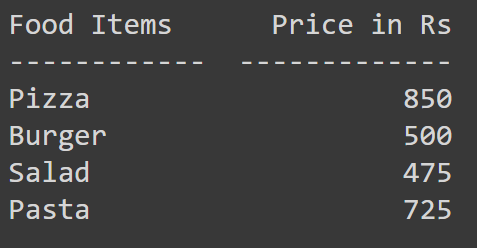
We can pass a list of lists (representing rows of data) to the tabulate() function. Here's how it works:
Output:
We can also pass a list of dictionaries, where each dictionary represents a row of data, with the keys as the headers.
Output:
The tabulate module offers various formatting options, such as table formats, text alignment, and the ability to customize headers. In this section, we will explore these formats and integrate tabulate with pandas DataFrames.
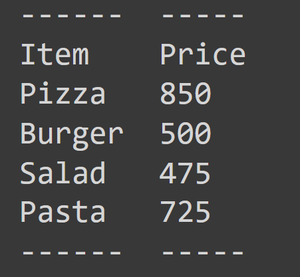
tabulate supports various formats, which can be specified using the tablefmt parameter. Some common formats include:
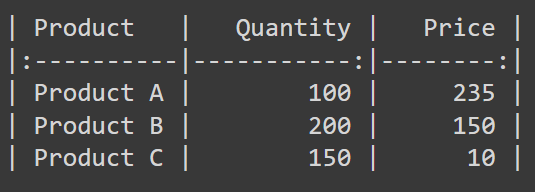
Example using the pipe format:
Output:
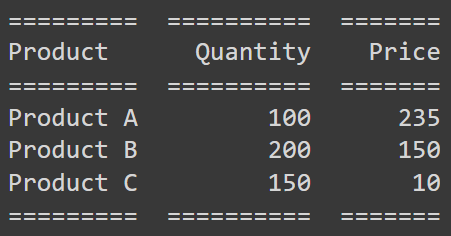
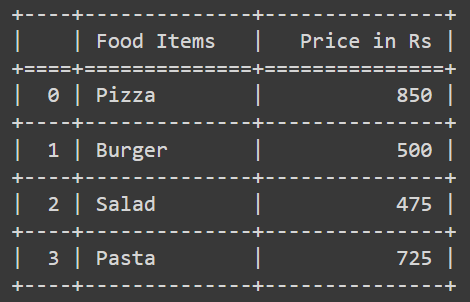
Example using the rst format:
Output:
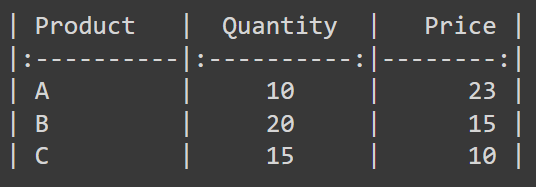
In the Tabulate, we can control the alignment of text using the colalign or align parameters. Here’s the syntax for that:
The alignment in the above code is as follows:
Example using colalilgn:
Output:
In the Tabulate module, by default, the headers are inferred from the data. However, we can also pass our own custom headers to the table using the headers parameter:
Output:
Tabulate integrates well with pandas, allowing us to display DataFrames as tables. Here's how we can convert a pandas DataFrame into a tabulated table:
Output:
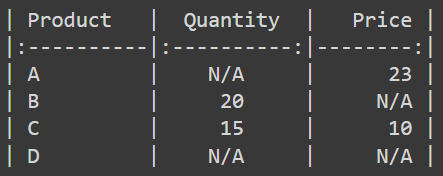
The Tabulate module can handle missing values effectively. If a value is missing (None or NaN in pandas), Tabulate has a parameter missingval that we can define, such as 'N/A', and it will replace the missing value.
Here’s an example showing that:
Output:
In this article, we learned about the Python tabulate module. This Python library is a simple yet powerful tool for creating well-formatted tables from Python data structures. We explored its features, uses, and solved some examples. The tabulate module supports many tabular formats, such as grid, plain, HTML, and others. With features like text alignment, customizable headers, and the ability to handle missing data, tabulate offers an easy way to display data in an organized manner with minimal code.