|
VOOZH | about |
|
VOOZH | about |
Pyenv is a tool that simplifies this process, providing a straightforward way to install, manage, and switch between various Python versions. In this article, we will learn about how to manage multiple Python versions with Pyenv.
Pyenv simplifies the process of managing multiple Python versions. You can install, switch, and manage Python versions effortlessly.
Once installed, key pyenv commands include:
Ensure Pyenv is installed correctly by running:
pyenv -vTo list all the available versions to install, rite the following command:
pyenv versionsTo install a specific Python version, use the pyenv install command
pyenv install 3.9.6Set the global default Python version
pyenv global 3.9.6Set a local Python version for a specific project:
cd my_project
pyenv local 3.8.10
Now let us see a working example, for a better understanding of how this works. In this example, we will create a new project and perform few of the above mentioned commands.
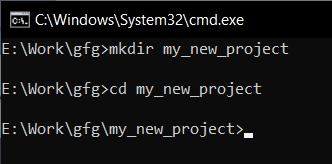
First of all, we will create a new directory for our project and move into that directory by typing the following commands in the terminal window.
mkdir my_new_project
cd my_new_project
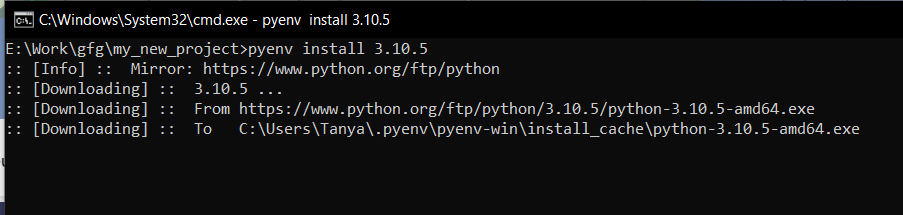
Next, we will install two different python versions and see how we can manage them using pyenv.
pyenv install 3.7.9
pyenv install 3.10.5
Next, we will set one Python version as a Local and another as a Global version.
pyenv local 3.7.9
pyenv global 3.10.5
We can also list all the installed versions by using pyenv using the following command
pyenv versionsManaging multiple Python versions is crucial for modern Python development, and Pyenv makes this task simple and efficient. Whether you're working on legacy code or the latest frameworks, Pyenv provides the flexibility and control needed to maintain a smooth development workflow.