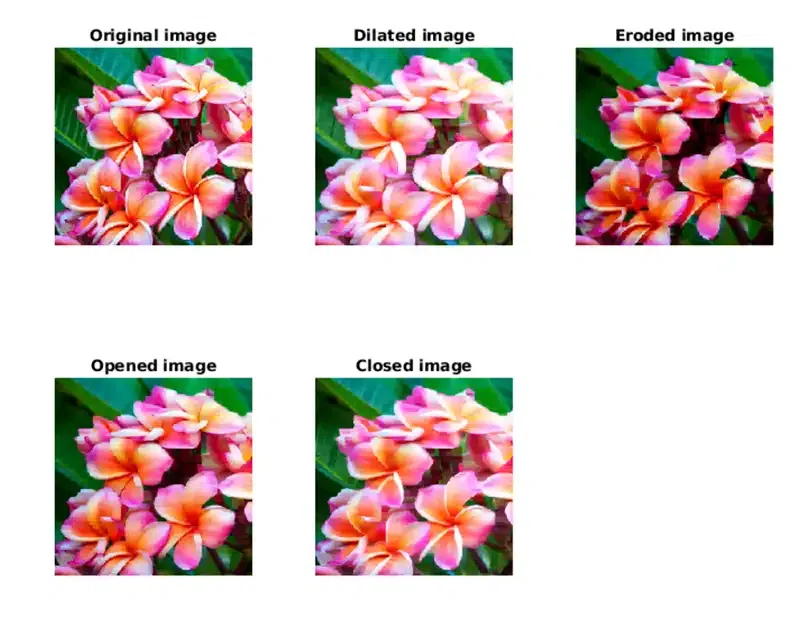
Morphological operations are a set of image processing techniques used to process geometrical structures in binary or grayscale images. They are primarily used for tasks such as noise removal, image enhancement, object segmentation and shape analysis. SciPy is a Python library used for scientific and technical computing includes a submodule called scipy.ndimage that provides a suite of tools for performing morphological operations.
Morphological operations
Morphological operations apply a structuring element to an input image and produce an output image of the same size. The basic idea is to probe the image with a small shape or template the structuring element and transform the image based on how the shape fits or misses the features in the input.
Erosion shrinks the white foreground regions in the image and the small white noises and separates connected objects.
It is used for removing small bright spots, thinning boundaries.
2. Dilation
Dilation expands the white regions in the image and fills small black holes and connects nearby objects.
It is used for filling gaps, joining broken parts.
3. Opening
Opening involves erosion followed by Dilation and it removes small bright noise without changing the main shape.
It is used for cleaning up small white noise, smoothing object edges.
4. Closing
Closing involves dilation followed by Erosion and it fills small dark holes and connects broken edges.
It is used for removing black spots inside objects, closing gaps.
5. Morphological Gradient
Morphological Gradient is the difference between the dilated image and the eroded image. It shows the outline or edges of objects in the image.
It is used for Edge detection.
6. Top Hat Transform
Top Hat transforms help you highlight small features in an image either bright spots or dark holes based on the object's structure. It consists of two parts:
1. White Top Hat: Difference between the input image and its opening.
2. Black Top Hat: Difference between the closing of the input image and the image itself.