|
VOOZH | about |
|
VOOZH | about |
In this article, I am Going to Build an Online auction system Using Django. Physical auctions are limited by location but online auctions are accessible globally. It opens a broader range of buyers. It Can Connect the Seller, Buyer, and admin.
Tools & Technologies Used in this Project :
Implementation :
Follow the below steps to implement the discussed project :
Step 1: Download Visual Studio Code and install it in your Device.
Step 2: After Setup Visual Studio Code.Press (Cntrl + Shift + X) and Install Python & Django Extension in it.
Step 3: Open Command Promt and Create a Directory.
>Mkdir Online_Auction
>cd Online_Auction
>code .
Step 4: Open shell of VSCode and create and activate virtual environment using below commands.
virtualenv venv
venv/Scripts/activate
pip install django
Step 4: Create the Project and app using the below commands.
django-admin startproject Online_Auction
cd Online_Auction
python manage.py startapp auction
Step 5:Add app name in Settings.py file. 'auction' or paste the below code in Settings.py file
Step :6 Paste the Below code in urls.py file in Online_Auction.
Step 7: Go to admin.py file and paste the below code.
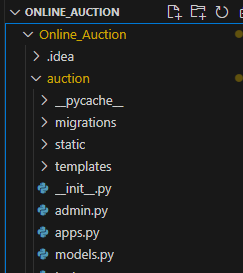
Step 9: Create two folders in auction one is "templates" , second is "static"
Step 10: Open views.py file from auction_app and paste the below code.
Step 11: Create the base.html file in templates folder and paste the below code.
Step 12: Create the home.html file in templates folder and paste the below code.
Step 13: Create the login.html file in templates folder and paste the below code.
Step 14: Create the register.html file in templates folder and paste the below code.
Step 15: Create the applybid.html file in templates folder and paste the below code.
Step :16 Open the Shell and run the following commands
Python manage.py makemigrations
python manage.py migrate
python manage.py runserver
Step: 17 Open the Browser and run the server.
Useful Resource: Building an auction system can be quite complex. For those looking to further explore advanced Django projects, the Django Web Development Course is a valuable resource.