|
VOOZH | about |
|
VOOZH | about |
OS module provides functions for interacting with the operating system. OS comes under Python's standard utility modules. This module provides a portable way of using operating system-dependent functionality.
The Current Working Directory (CWD) is the folder where Python is currently operating. When files are opened without specifying a full path, Python searches for them in this directory. This directory may be different from the location where the Python script is stored.
Getting Current Working Directory: To get the location of the current working directory, the os.getcwd() function from the os module is used. The following code prints the current working directory (CWD).
Output
Current working directory: /home/nikhil/Desktop/gfg
Changing Current Working Directory: It can be changed using os.chdir(path), which switches Python’s context to the specified directory. The following code prints the CWD before and after changing it one level up using os.chdir('../').
Output
Current working directory before
C:\Users\Nikhil Aggarwal\Desktop\gfg
Current working directory after
C:\Users\Nikhil Aggarwal\Desktop
Using os.mkdir():os.mkdir() is used to create a directory at the specified path and can optionally set a permission mode. It raises a FileExistsError if the directory already exists. The following code demonstrates creating directories with and without a specified mode.
Output
Directory 'GeeksforGeeks' created
Directory 'Geeks' created
Using os.makedirs(): os.makedirs() is used to create directories recursively, meaning it also creates any missing parent directories. The following code demonstrates creating directories with and without a specified permission mode (0o666).
Output
Directory 'Nikhil' created
Directory 'c' created
os.listdir() method returns a list of files and directories in the specified path. If no path is provided, it lists the contents of the current working directory. The following code demonstrates listing files and directories from a given path.
Output
Files and directories in ' / ' :
['sys', 'run', 'tmp', 'boot', 'mnt', 'dev', 'proc', 'var', 'bin', 'lib64', 'usr',
'lib', 'srv', 'home', 'etc', 'opt', 'sbin', 'media']
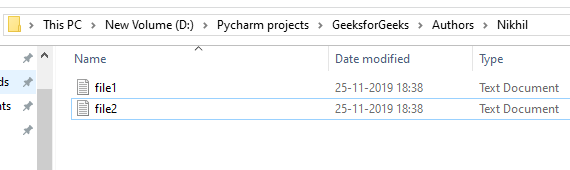
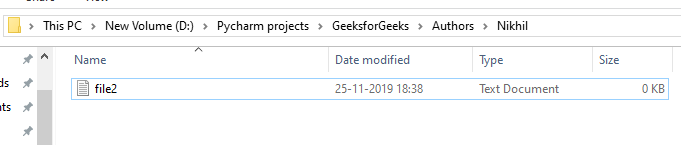
Using os.remove():os.remove() method is used to delete a file at the specified path. It cannot delete directories and will raise an OSError if the given path refers to a directory. Suppose the file contained in the folder are:
Example: This code removes a file named "file1.txt" from the specified location "D:/Pycharm/projects/GeeksforGeeks/Authors/Nikhil/". It uses the os.remove function to delete the file at the specified path.
Output
👁 Image
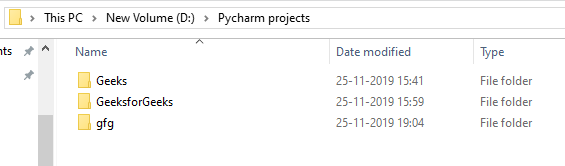
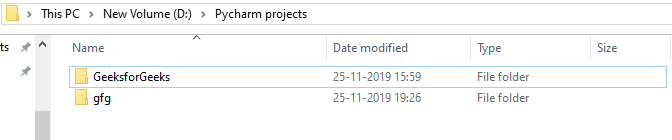
Using os.rmdir():os.rmdir() method is used to remove or delete an empty directory. OSError will be raised if the specified path is not an empty directory. Suppose the directories are:
Example: This code removes an empty directory named "Geeks" using the os.rmdir() function. If the directory contains files or subdirectories, it will raise an error.
Output
OS module provides access to lower-level file system metadata and permission handling useful for scripting, administration and system-level tasks. Three important methods in this category are:
Using os.chmod(): os.chmod() method is used to change the permissions (read, write, execute) of a file or directory. Permissions must be passed in octal format (e.g., 0o600).
Explanation: 0o600 means:
Using os.chown(): os.chown() method allows to change the owner and group ID of a file. This is typically used in system scripts and requires appropriate permissions. It is used in Unix/Linux systems only.
Explanation:
Using os.stat(): os.stat() method is used to retrieve metadata about a file such as its size, permissions and timestamps.
Output
Size: 48 bytes
Last modified: 1720948800.0
Permissions: 600
Explanation:
1. Using os.name function: gives the name of the operating system dependent module imported. The following names have currently been registered: 'posix', 'nt', 'os2', 'ce', 'java' and 'riscos'.
Output
posix
Note: It may give different output on different interpreters, such as 'posix' when you run the code here.
2. Using os.error Function: All functions in this module raise OSError in the case of invalid or inaccessible file names and paths, or other arguments that have the correct type, but are not accepted by the operating system. os.error is an alias for built-in OSError exception.
Output
Problem reading: GFG.txt
Note: os.error is just an alias for Python’s built-in OSError. In modern Python, you should directly use OSError (or FileNotFoundError, PermissionError, etc. for more specific cases).
3. Using os.popen(): opens a pipe to or from command. The return value can be read or written depending on whether the mode is 'r' or 'w'. Below is the syntax:
os.popen(command[, mode[, bufsize]])
Parameters mode & bufsize are not necessary parameters, if not provided, default 'r' is taken for mode.
Output
Hello
4. Using os.close(): A file opened using open(), can be closed by close() only. But file opened through os.popen(), can be closed with close() or os.close(). If we try closing a file opened with open(), using os.close(), Python would throw TypeError.
Output
Traceback (most recent call last):
File "C:\Users\GFG\Desktop\GeeksForGeeksOSFile.py", line 6, in
os.close(file)
TypeError: an integer is required (got type _io.TextIOWrapper)
Note: os.close() works only with low-level file descriptors (integers from os.open()), not with file objects created by open(). That’s why the above example raises a TypeError.
5. Using os.rename(): A file "old.txt" can be renamed to "new.txt", using the function os.rename(). The name of the file changes only if, the file exists and the user has sufficient privilege permission to change the file.
Output
Traceback (most recent call last):
File "C:\Users\GFG\Desktop\ModuleOS\GeeksForGeeksOSFile.py", line 3, in
os.rename(fd,'New.txt')
FileNotFoundError: [WinError 2] The system cannot find the
file specified: 'GFG.txt' -> 'New.txt'
6. Using os.path.exists(): check whether a file exists or not by passing the name of the file as a parameter. OS module has a sub-module named PATH by using which we can perform many more functions.
Output
False
As in the above code, the file does not exist it will give output False. If the file exists it will give us output True.
7. Using os.path.getsize(): gives the size of the file in bytes. To use this method we need to pass the name of the file as a parameter.
Output
Size of the file is 192 bytes.