VOOZH about

URL: https://www.geeksforgeeks.org/python/pandas-dataframe-to-csv-file-using-tab-separator/

⇱ Pandas - DataFrame to CSV file using tab separator - GeeksforGeeks


  • Courses
  • Tutorials
  • Interview Prep

Pandas - DataFrame to CSV file using tab separator

Last Updated : 15 Jul, 2025

Let's see how to convert a DataFrame to a CSV file using the tab separator. We will be using the to_csv() method to save a DataFrame as a csv file. To save the DataFrame with tab separators, we have to pass "\t" as the sep parameter in the to_csv() method.

Approach : 

  1. Import the Pandas and Numpy modules.
  2. Create a DataFrame using the DataFrame() method.
  3. Save the DataFrame as a csv file using the to_csv() method with the parameter sep as "\t".
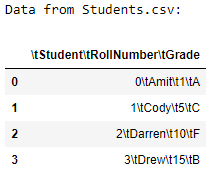
  4. Load the newly created CSV file using the read_csv() method as a DataFrame.
  5. Display the new DataFrame.

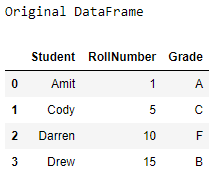
Output : 

👁 Image


👁 Image


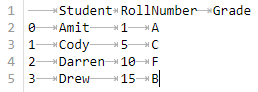
The contents of the Students.csv file are : 

👁 Image


Comment