|
VOOZH | about |
|
VOOZH | about |
Multi-index and Groupby are very important concepts of data manipulation. Multi-index allows you to represent data with multi-levels of indexing, creating a hierarchy in rows and columns.
Groupby lets you create groups of similar data and apply aggregate functions (e.g., mean, sum, count, standard deviation) to each group, condensing large datasets into meaningful summaries.
Using both these tools together allows you to analyze data from a different aspect.
In this article, we will discuss Multi-index for Pandas Dataframe and Groupby operations.
Multi-index allows you to select more than one row and column in your index.
It is a multi-level or hierarchical object for Pandas object.
We can use various methods of multi-index such as MultiIndex.from_arrays(),MultiIndex.from_tuples(),MultiIndex.from_product(),MultiIndex.from_frame, etc., which helps us to create multiple indexes from arrays, tuples, DataFrame, etc.
pandas.MultiIndex(levels=None, codes=None, sortorder=None, names=None, dtype=None, copy=False, name=None, verify_integrity=True)
Let us see some examples to understand the concept better.
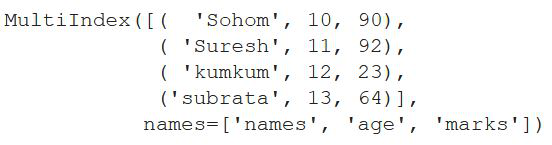
After importing all the important Python libraries, we are creating an array of names along with arrays of marks and age respectively.
Now with the help of MultiIndex.from_arrays, we are combining all three arrays such that elements from all three arrays form multiple indexes together. After that, we show the above result.
Output:
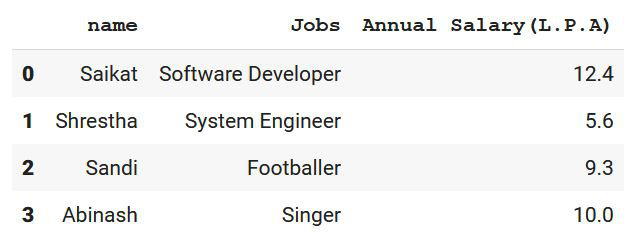
In this example, we are doing the same thing as the previous example. We created a DataFrame using pd.DataFrame and after that, we created multi-index from that DataFrame using multi-index.from_frame() along with the names.
Output:
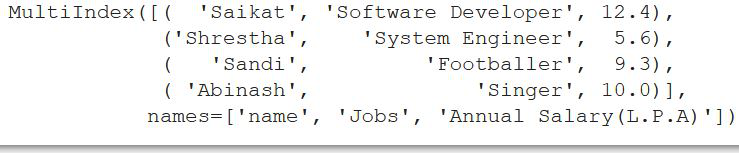
Now using MultiIndex.from_frame(), we are creating multiple indexes with this DataFrame.
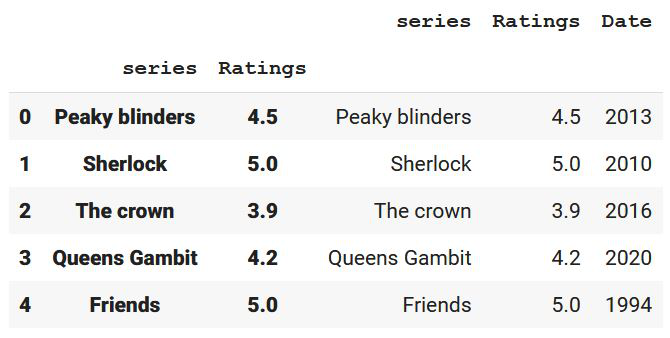
After importing the Pandas library, we created data and then converted it into tabular form with the help of pandas.DataFrame.
After that using Dataframe.set_index we are setting some columns as the index columns(Multi-Index).
The drop parameter is kept as false which will not drop the columns mentioned as index columns and thereafter append parameter is used for appending passed columns to the already existing index columns.
Output:
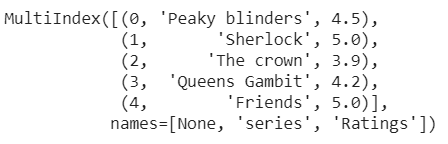
Now, we are printing the index of DataFrame in the form of a multi-index.
Output:
A groupby operation in Pandas helps us to split the object by applying a function and there-after combine the results.
After grouping the columns according to our choice, we can perform various operations which can eventually help us in the analysis of the data.
DataFrame.groupby(by=None, axis=0, level=None, as_index=True, sort=True, group_keys=True, squeeze=<object object>, observed=False, dropna=True)
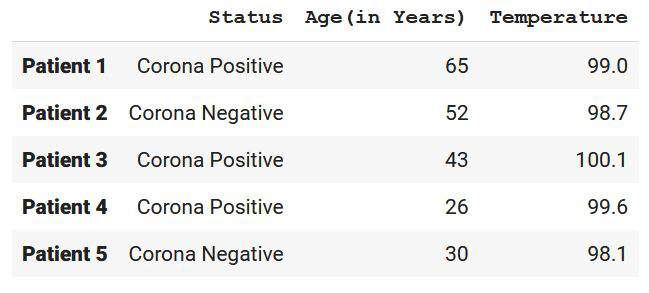
First, let's create a DataFrame on which we will perform the groupby operation.
Output:
Now let us group them according to some features:
As we can see, we have grouped them according to 'Status' and 'Temperature and Status'. Let us perform some functions now:
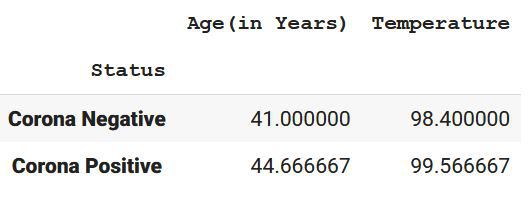
Example: Finding the mean of a Group
This will create the mean of the numerical values according to the 'status'.
We have covered the concept of Multi index and groupby in Pandas Python in this tutorial. Both these concepts are very crucial in data manipulation while doing data analysis.
Multi-index allows you to create a hierarchal structure in your data structure, while groupby allows you to group similar data to perform analysis on it.
Using both these techniques together will help in better data presentation and provide you with some unseen insights, increasing the quality of your data analysis project.