|
VOOZH | about |
|
VOOZH | about |
Python is a great language for doing data analysis, primarily because of the fantastic ecosystem of data-centric Python packages. Pandas is one of those packages that makes importing and analyzing data much easier. Analyzing data requires a lot of filtering operations. Pandas Dataframe provide many methods to filter a Data frame and Dataframe.query() is one of them.
Syntax: DataFrame.query(expr, inplace=False, **kwargs)
Parameters:
- expr: Expression in string form to filter data.
- inplace: Make changes in the original data frame if True
- kwargs: Other keyword arguments.
Return type: Filtered Data frame
Dataframe.query() method only works if the column name doesn't have any empty spaces. So before applying the method, spaces in column names are replaced with '_' . To download the CSV file used, Click Here.
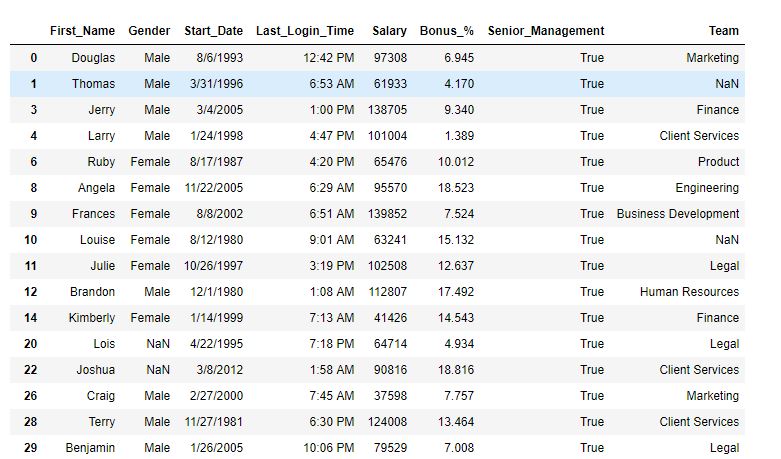
Example 1: Single condition filtering In this example, the data is filtered on the basis of a single condition. Before applying the query() method, the spaces in column names have been replaced with '_'.
Output:
As shown in the output image, the data now only have rows where Senior Management is True.
Example 2: Multiple conditions filtering In this example, Dataframe has been filtered on multiple conditions. Before applying the query() method, the spaces in column names have been replaced with '_'.
Output:
As shown in the output image, only two rows have been returned on the basis of filters applied.