|
VOOZH | about |
|
VOOZH | about |
Web pages use HTML for the things that users see or interact with. But how do we show things from an external source or a controlling programming language like Python? To achieve this templating engine like Jinja2 is used. Jinja2 is a templating engine in which placeholders in the template allow writing code similar to Python syntax which after passing data renders the final document. In this article we will cover some of the points as mentioned below:
Let's start by creating a virtual environment. It's always a good idea to work in a virtual environment as it will not cause changes to the global system environment. For using Jinja2 in Python, we need to install the Jinja2library.
pip install Jinja2
Jinja2 is a Python library that allows us to build expressive and extensible templates. It has special placeholders to serve dynamic data. A Jinja template file is a text file that does not have a particular extension.
For a placeholder, we have the following syntax in Jinja2.
{{variable_name}}In an HTML file called index_template.html, write the following code.
app.py
We open this HTML file in Python and read its content to a variable called content. Pass the content to Template, and store it in the template variable. Now, we will pass the name and email to render and replace the placeholders {{pl_name}} and {{pl_email}} respectively, by using template.render; and store this in rendered_form.
The index.html file is created in the variable output. Write the content to this HTML file using output.write(rendered_form). Below are the two files before running the Python program.
Now, run app.py using the following command:
python app.py
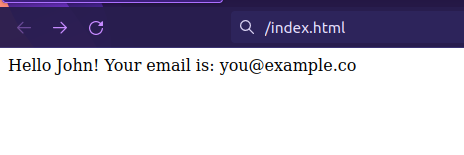
A new file is created named index.html. Open it and see the code. The placeholder text is changed to the values that we passed.
Jinja in-line conditionals are started with a curly brace and a % symbol, like {% if condition %} and closed with {% endif %}. You can optionally include both {% elif %} and {% else %} tags, and for loop, we use {% for index in numbers %} and end with {% endfor %}.
For conditions, we have the following syntax in Jinja2.
For loop | If condition |
|---|---|
|
{% for i in numbers %} {% endfor %} | {% if i % 2== 0 %} {% endif %} |
Example
A list can also be passed using Jinja. To iterate through the list and for using conditions, similar to Python we use loop and if-condition. Let's pass a list of numbers as well:
index_template.html
Here we will iterate the number and print the even number from the list.
Output:
Template inheritance is a very good feature of Jinja templating. All that is needed is to add a {% extend %} tag. The home page {% extends “base. html” %} inherits everything from the base template.
For Inherit the base page, we have the following syntax in Jinja2.
{% block content %}
<Code>
{% endblock %}
{% extends "base.html" %}
{% block content %}
<Code>
{% endblock %}
Example
Here, we want to use the same HTML content across pages like a Website name or a search bar without repeating the HTML code. For this Jinja2 has a feature called template inheritance. Suppose we need this heading and search bar on every page without repeating the code:
base.html: This is the code of the website name and search bar.
Let's include this in our index_template.html. In the child template or the page, you want to include the website name and search bar.
Output: