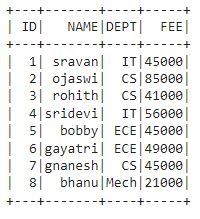
|
VOOZH | about |
|
VOOZH | about |
In this article, we are going to discuss Groupby function in PySpark using Python.
Output:
👁 ImageIn PySpark, groupBy() is used to collect the identical data into groups on the PySpark DataFrame and perform aggregate functions on the grouped data
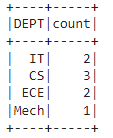
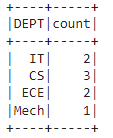
dataframe.groupBy('column_name_group').count()
dataframe.groupBy('column_name_group').mean('column_name')
dataframe.groupBy('column_name_group').max('column_name')
dataframe.groupBy('column_name_group').min('column_name')
dataframe.groupBy('column_name_group').sum('column_name')
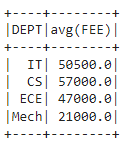
dataframe.groupBy('column_name_group').avg('column_name').show()
We have to use any one of the functions with groupby while using the method
Syntax: dataframe.groupBy('column_name_group').aggregate_operation('column_name')
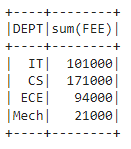
Groupby with DEPT along FEE with sum().
Output:
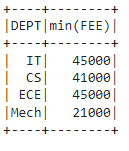
👁 ImageOutput:
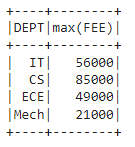
👁 ImageOutput:
👁 ImageOutput:
👁 ImageOutput:
👁 ImageOutput:
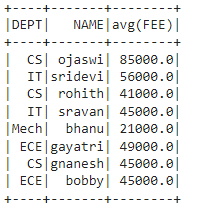
👁 ImageHere we are going to use groupby() on multiple columns.
Syntax: dataframe.groupBy('column_name_group1','column_name_group2',............,'column_name_group n').aggregate_operation('column_name')
Output:
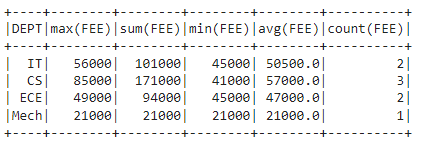
👁 ImageWe can also groupBy and aggregate on multiple columns at a time by using the following syntax:
dataframe.groupBy("group_column").agg( max("column_name"),sum("column_name"),min("column_name"),mean("column_name"),count("column_name")).show()
We have to import these agg functions from the module sql.functions.
Example: