|
VOOZH | about |
|
VOOZH | about |
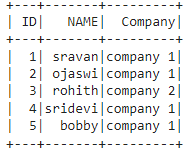
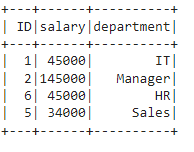
In PySpark, joins combine rows from two DataFrames using a common key. Common types include inner, left, right, full outer, left semi and left anti joins. Each type serves a different purpose for handling matched or unmatched data during merges. The syntax is:
dataframe1.join(dataframe2,dataframe1.column_name == dataframe2.column_name,"type")
where,
Output
👁 ImageOutput
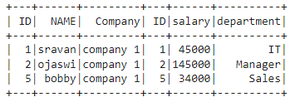
👁 ImageThis will join the two PySpark dataframes on key columns, which are common in both dataframes. Syntax:
dataframe1.join(dataframe2,dataframe1.column_name == dataframe2.column_name,"inner")
Example:
Output
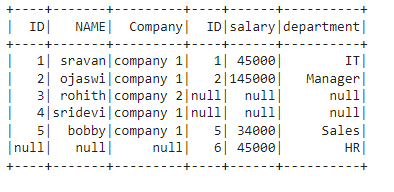
👁 ImageThis join joins the two dataframes with all matching and non-matching rows, we can perform this join in three ways. Syntax:
- outer: dataframe1.join(dataframe2,dataframe1.column_name == dataframe2.column_name,"outer")
- full: dataframe1.join(dataframe2,dataframe1.column_name == dataframe2.column_name,"full")
- fullouter: dataframe1.join(dataframe2,dataframe1.column_name == dataframe2.column_name,"fullouter")
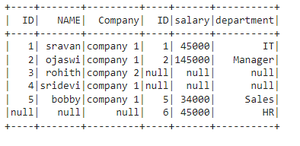
In this example, we are going to perform outer join based on the ID column in both dataframes.
Output
👁 ImageIn this example, we are going to perform outer join using full keyword based on ID column in both dataframes.
Output
👁 ImageIn this example, we are going to perform outer join using full outer based on ID column in both dataframes.
Output
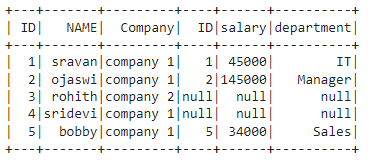
👁 ImageHere this join joins the dataframe by returning all rows from the first dataframe and only matched rows from the second dataframe with respect to the first dataframe. We can perform this type of join using left and leftouter. Syntax:
- left: dataframe1.join(dataframe2,dataframe1.column_name == dataframe2.column_name,"left")
- leftouter: dataframe1.join(dataframe2,dataframe1.column_name == dataframe2.column_name,"leftouter")
In this example, we are going to perform left join using the left keyword based on the ID column in both dataframes.
Output
👁 ImageIn this example, we are going to perform left join using leftouter keyword based on the ID column in both dataframes
Output
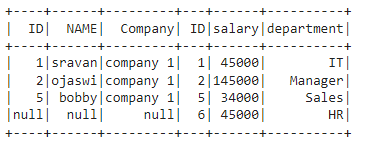
👁 ImageHere this join joins the dataframe by returning all rows from the second dataframe and only matched rows from the first dataframe with respect to the second dataframe. We can perform this type of join using right and rightouter. Syntax:
- right: dataframe1.join(dataframe2,dataframe1.column_name == dataframe2.column_name,"right")
- rightouter: dataframe1.join(dataframe2,dataframe1.column_name == dataframe2.column_name,"rightouter")
In this example, we are going to perform right join using the right keyword based on ID column in both dataframes.
Output
👁 ImageIn this example, we are going to perform the right join using rightouter keyword based on the ID column in both dataframes.
Output
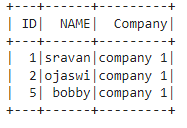
👁 ImageThis join will all rows from the first dataframe and return only matched rows from the second dataframe. Syntax:
dataframe1.join(dataframe2,dataframe1.column_name == dataframe2.column_name,"leftsemi")
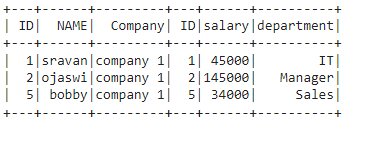
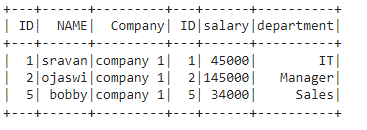
Example: In this example, we are going to perform leftsemi join using leftsemi keyword based on the ID column in both dataframes.
Output
👁 ImageThis join returns only columns from the first dataframe for non-matched records of the second dataframe. Syntax:
dataframe1.join(dataframe2,dataframe1.column_name == dataframe2.column_name,"leftanti")
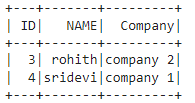
Example: In this example, we are going to perform leftanti join using leftanti keyword based on the ID column in both dataframes.
Output:
👁 ImageWe can perform all types of the above joins using an SQL expression, we have to mention the type of join in this expression. To do this, we have to create a temporary view. Syntax:
dataframe.createOrReplaceTempView("name")
where
- dataframe is the input dataframe
- name is the view name
Now we can perform join on these views using spark.sql().Syntax:
spark.sql("select * from dataframe1, dataframe2 where dataframe1.column_name == dataframe2.column_name ")
where,
- dataframe1 is the first view dataframe
- dataframe2 is the second view dataframe
- column_name is the column to be joined
Output
👁 ImageWe can also perform the above joins using this SQL expression. Syntax:
spark.sql("select * from dataframe1 JOIN_TYPE dataframe2 ON dataframe1.column_name == dataframe2.column_name ")
where, JOIN_TYPE refers to above all types of joins