|
VOOZH | about |
|
VOOZH | about |
In this article, we will see how to sort the data frame by specified columns in PySpark. We can make use of orderBy() and sort() to sort the data frame in PySpark
OrderBy() function is used to sort an object by its index value.
Syntax: DataFrame.orderBy(cols, args)
Parameters :
- cols: List of columns to be ordered
- args: Specifies the sorting order i.e (ascending or descending) of columns listed in cols
Return type: Returns a new DataFrame sorted by the specified columns.
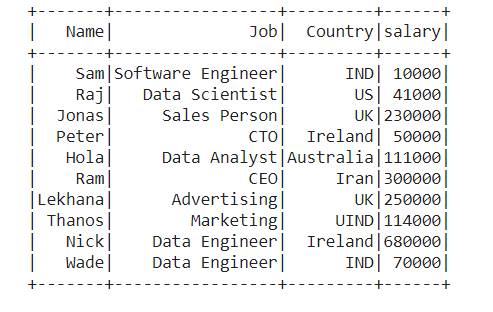
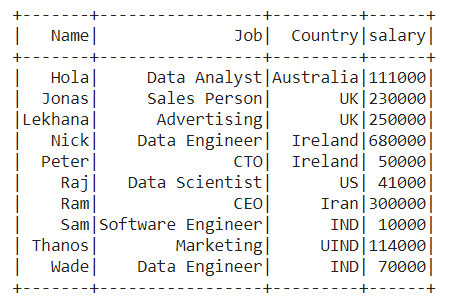
Dataframe Creation: Create a new SparkSession object named spark then create a data frame with the custom data.
Output :
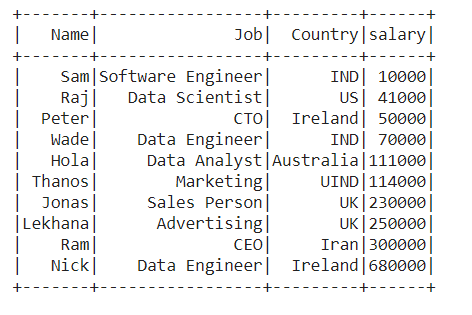
👁 ImageExample 1: Sorting the data frame by a single column
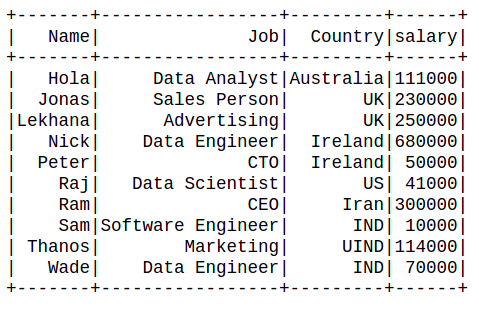
Sort the data frame by the ascending order of 'Salary' of employees in the data frame.
Output :
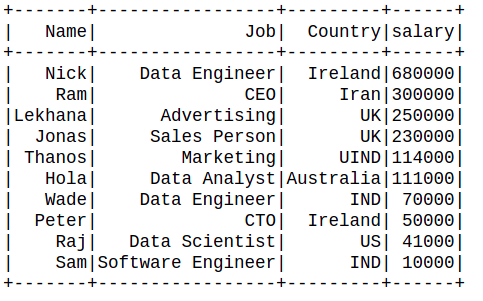
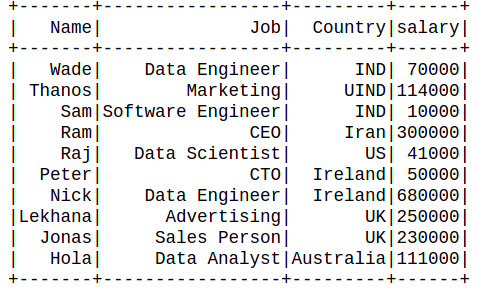
👁 ImageExample 2: Sorting the data frame in decreasing order.
Output:
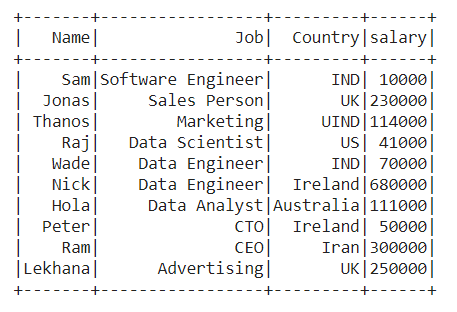
👁 ImageExample 3: Sorting the data frame by more than one column
Sort the data frame by the descending order of 'Job' and ascending order of 'Salary' of employees in the data frame. When there is a conflict between two rows having the same 'Job', then it'll be resolved by listing rows in the ascending order of 'Salary'.
Output :
👁 ImageIt takes the Boolean value as an argument to sort in ascending or descending order.
Syntax:
sort(x, decreasing, na.last)Parameters:
x: list of Column or column names to sort by
decreasing: Boolean value to sort in descending order
na.last: Boolean value to put NA at the end
Example 1: Sort the data frame by the ascending order of the "Name" of the employee.
Output :
👁 ImageExample 2: Sort the column in decreasing order.
Output:
👁 ImageExample 3: Sort multiple columns in ascending order.