|
VOOZH | about |
|
VOOZH | about |
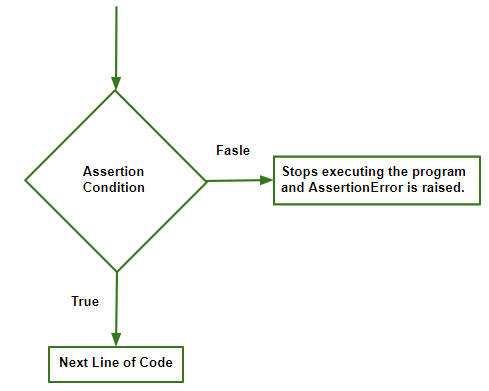
Assertions are a powerful tool in Python used to check that conditions hold true while your program runs. By using the assert statement, we can declare that a certain condition must be true at a specific point in our code. If the condition is true, execution continues normally; if it is false, an AssertionError is raised and the program stops (or the error is caught if handled).
This mechanism is especially useful for catching bugs early, validating input values and enforcing invariants in your code.
👁 Imageassert condition, error_message
Parameters:
Output :
Traceback (most recent call last):
 File "/home/bafc2f900d9791144fbf59f477cd4059.py", line 4, in
 assert y!=0, "Invalid Operation" # denominator can't be 0
AssertionError: Invalid Operation
Explanation:
The default exception handler in python will print the error_message written by the programmer, or else will just handle the error without any message, both the ways are valid.
Assertions can be caught and handled using a try-except block. This is useful when you want to gracefully handle the error and provide custom output.
In Example 1 we have seen how the default exception handler does the work. Now let's dig into handling it manually:
Invalid Operation: Denominator cannot be 0
Explanation:
Assertions are often used in testing to validate that functions produce the expected results. Consider the following example for solving a quadratic equation.
Roots of the quadratic equation are: 2.0 3.0
Roots are imaginary
Roots of the quadratic equation are: -3.0 -3.0
Explanation: