|
VOOZH | about |
|
VOOZH | about |
Python bitwise operators are used to perform bitwise calculations on integers. The integers are first converted into binary and then operations are performed on each bit or corresponding pair of bits and the result is then returned in decimal format.
Note: Python bitwise operators work only on integers.
| Operator | Description | Syntax |
|---|---|---|
| & | Bitwise AND | x & y |
| | | Bitwise OR | x | y |
| ~ | Bitwise NOT | ~x |
| ^ | Bitwise XOR | x ^ y |
| >> | Bitwise right shift | x>> |
| << | Bitwise left shift | x<< |
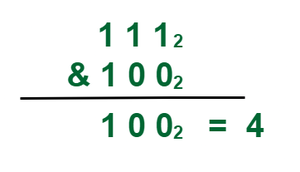
Python Bitwise AND (&) operator takes two equal-length bit patterns as parameters. The two-bit integers are compared. If the bits in the compared positions of the bit patterns are 1, then the resulting bit is 1. If not, it is 0.
Example: Take two-bit values X and Y, where X = 7= (111)2 and Y = 4 = (100)2 Take Bitwise and of both X & Y
Note: Here, (111)2 represent binary number.
a & b = 0
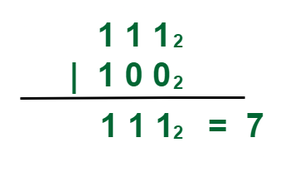
Python Bitwise OR (|) Operator takes two equivalent length bit designs as boundaries, if the two bits in the looked-at position are 0, the next bit is zero. If not, it is 1.
Example: Take two-bit values X and Y, where X = 7= (111)2 and Y = 4 = (100)2 Take Bitwise OR of both X, Y
a | b = 14
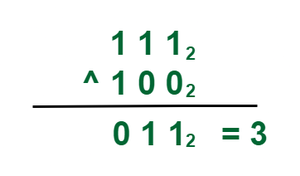
Python Bitwise XOR (^) Operator also known as the exclusive OR operator, is used to perform the XOR operation on two operands, i.e., it compares corresponding bits of two operands and returns true if and only if exactly one of the operands is true.
Example: Take two-bit values X and Y, where X = 7= (111)2 and Y = 4 = (100)2 Take Bitwise and of both X & Y
a ^ b = 14
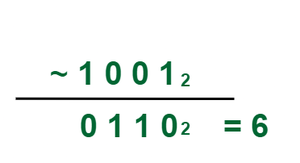
Python Bitwise Not (~) is a unary operator that returns one's complement of the operand. This means it toggles all bits in the value, transforming 0 bits to 1 and 1 bits to 0.
Example: Take two-bit values X and Y, where X = 5= (101)2 Take Bitwise NOT of X.
~a = -11
These operators are used to shift the bits of a number left or right thereby multiplying or dividing the number by two respectively. They can be used when we have to multiply or divide a number by two.
Shifts the bits of the number to the right and fills the vacated bit positions on the left with 0s (or with 1s for negative numbers). As a result., similar effect as of dividing the number with some power of two.
Example 1: Right shifting a positive integer
a = 10 = 0000 1010 (Binary)
a >> 1 = 0000 0101 = 5
Example 2: Right shifting a positive integer
a = -10 = 1111 0110 (Binary)
a >> 1 = 1111 1011 = -5
a >> 1 = 5
b >> 1 = -5
Shifts the bits of the number to the left and fills 0 on voids right as a result. Similar effect as of multiplying the number with some power of two.
Example 1: Left shifting a positive integer
a = 5 = 0000 0101 (Binary)
a << 1 = 0000 1010 = 10
Example 2: Left shifting a negative integer
b = -10 = 1111 0110 (Binary)
b << 1 = 1110 1100 = -20
a << 1 = 10
b << 1 = -20
Operator Overloading means giving extended meaning beyond their predefined operational meaning. For example, operator + is used to add two integers, concatenate two strings, and concatenate two lists. It is achievable because the '+' operator is overloaded by int class and str class.
Below is a simple example of Bitwise operator overloading.
And operator overloaded
8
Or operator overloaded
14
Xor operator overloaded
6
lshift operator overloaded
40960
rshift operator overloaded
0
Invert operator overloaded
-11
Explanation: