|
VOOZH | about |
|
VOOZH | about |
Python offers multiple options for developing a GUI (Graphical User Interface). Out of all the Python GUI Libraries, Tkinter is the most commonly used method. In this article, we will learn how to create a Compound Interest GUI Calculator application using Tkinter.
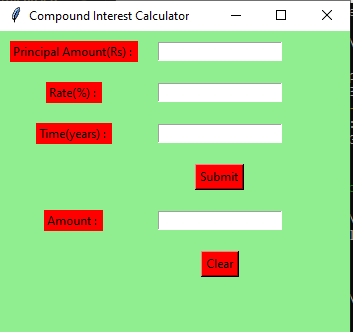
Let’s create a GUI-based Compound Interest Calculator application.
Below is what the GUI will look like:
tkinter Library: from tkinter import *This imports all classes and functions from the tkinter library, which is used to create the GUI.
This function clears the content of all entry fields and sets the focus back to the principal_field.
This function retrieves values from the entry fields, calculates the compound interest, and inserts the result into the compound_field.
This part initializes the main window of the GUI, sets the background color, window size, and title.
These lines create labels for the GUI and position them using the grid method.
These lines create entry fields for user input and position them using the grid method.
These lines create buttons for submitting the form and clearing the fields, and position them using the grid method.
root.mainloop()Output