|
VOOZH | about |
|
VOOZH | about |
Python Falcon, a nimble web framework, simplifies the process of building web APIs by efficiently managing incoming requests, which are messages asking for something from your API, and providing an easy way to create structured responses that Falcon then sends back to the requester, making it a swift and scalable choice for API development in Python.
In Falcon, handling requests is achieved through resource classes. These classes, responsible for specific routes, define methods for various HTTP methods like GET, POST, etc. Let's discuss a basic example:
Example 1:
In this example, the on_get method retrieves the name query parameter from the request, defaulting to Guest if absent. The below code sets up a Falcon web API with a single resource, `HelloNameResource`, responding to GET requests at '/hello'. It retrieves a 'name' parameter from the request, defaulting to 'Guest' if absent, and returns a personalized greeting. The server runs on http://127.0.0.1:8000, allowing users to access personalized greetings by appending a name to '/hello'.
Run the Server
python script_name.pyOutput
👁 second-
In Falcon `Response` is an object representing the HTTP response, allowing customization of status codes, headers, and body content in a Falcon API endpoint. It is used to define what the API should return to the client.
Example 2:
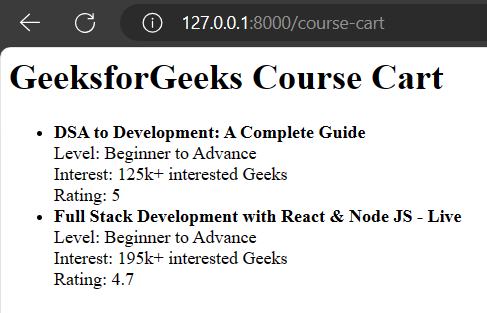
In this example, When a GET request is sent to the '/course-cart' endpoint, it returns an HTML response with information about GeeksforGeeks courses such as name, level, interest, and rating. The HTML response is an HTML document that includes a title, header, and list of courses. Falcon's response object attributes are then set to define the HTTP status as 200 (OK), the response text as the generated HTML, the content type as 'text/html', and a 'Cache-Control' header to prevent caching. The Falcon application is created, and the '/course-cart' endpoint is linked to the CourseCartResource class.
Run the Server
python script_name.py
Output:
python.py: This Python code uses the Falcon framework to create a simple API for handling feedback submissions. It begins by importing the necessary modules, including Falcon for building the API and Falcon CORS for enabling Cross-Origin Resource Sharing (CORS). The Falcon API instance is created, and CORS middleware is added to allow all origins, headers, and methods. The code defines a FeedbackResource class with a single method, on_post, which handles POST requests to the "/feedback" endpoint. The method extracts JSON data from the request body, processes the feedback (in this case, printing it to the console), and constructs an HTML response indicating successful feedback submission.
index.html : This HTML code represents a simple feedback form webpage. The document includes standard metadata, such as the document type declaration, character set, and viewport settings. It links an external stylesheet ("styles.css") for styling. The inline styles define the layout and appearance of the form, with a flex container setting for centering content and specific styling for various form elements. The form collects user feedback, including their name and a message. Upon submission, the form sends a POST request to the "http://127.0.0.1:8000/feedback" endpoint. The form includes a title ("GeeksforGeeks") and is styled with a clean and responsive design, making use of a green color theme. The response section, with an ID of "response," is styled to display a success tick icon and a response message.
Run the Server
python script_name.py
Output:
Understanding request handling and response crafting is fundamental in Falcon development. Falcon's simplicity and the power of its request and response objects make it a compelling choice for building robust and efficient web APIs. As you progress with Falcon, you'll discover additional features enhancing your ability to create powerful and scalable web applications.