|
VOOZH | about |
|
VOOZH | about |
MySQL is a Relational Database Management System (RDBMS) whereas the structured Query Language (SQL) is the language used for handling the RDBMS using commands i.e Creating, Inserting, Updating and Deleting (CRUD) the data from the databases. SQL commands are case insensitive i.e "CREATE" and "create" signify the same command.
In this article, we will discuss how to create a table in MySQL using Python.
To get started, you'll need to install the MySQL Connector for Python. This allows Python to interact with a MySQL database.
pip install mysql-connector
This method is used to establish a connection with the MySQL server. It takes the following arguments:
This method creates a cursor in the system memory. The cursor is the workspace for executing SQL commands. It remains open for the entire session.
The execute() method takes an SQL query as an argument and executes it. You can use this method to perform operations like creating, inserting, updating, or deleting data.
A database is an organized collection of data stored in tables. These tables are designed to make data manipulation (like creation, insertion, updates, and deletions) easy and efficient.
CREATE DATABASE database_name;
Example: Creating a database called "College".
Output:
College Data base is created
👁 ImageNote: Make sure to enter your own MySQL user and password to connect with MySQL server.
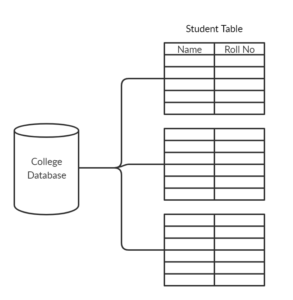
The table is a collection of data organized in the form of rows and columns. Table is present within a database as you can see from the above image.
As we have discussed that tables are created inside a database so we need to first make sure to select or move into to the database before creating a table. To select the "College" database use this command:
USE college;
This will select the "College" database, now we can proceed to create tables inside it. Here's how to create a table:
CREATE TABLE table_name
(
column_name_1 column_Data_type,
column_name_2 column_Data_type,
:
:
column_name_n column_Data_type
);
SQL Data Types:
For instance, let's suppose we have to create a table named "STUDENT" having two columns, here's how we can do it:
CREATE TABLE Student (
Name VARCHAR(255),
Roll_no INT
);
Let’s consider an example where we create a table named Student inside the "College" database. The Student table will have two columns: Name (for the student's name) and Roll_no (for the student's roll number).
Python Code to Create a Table:
Output:
Student Table is Created in the Database