VOOZH about

URL: https://www.geeksforgeeks.org/python/python-opencv-cv2-cvtcolor-method/

⇱ Python OpenCV | cv2.cvtColor() method - GeeksforGeeks


  • Courses
  • Tutorials
  • Interview Prep

Python OpenCV | cv2.cvtColor() method

Last Updated : 11 Aug, 2025

cv2.cvtColor() is an OpenCV function that converts an image from one color space to another.

It supports over 150 color conversion methods, but in most cases, only a few (like BGR↔GRAY or BGR↔RGB) are used frequently in real-world projects.

Reasons for Changing Color Spaces

Different tasks require different representations of an image:

  • Grayscale: Simplifies image analysis and reduces processing time.
  • HSV (Hue, Saturation, Value): Useful for color-based segmentation and object tracking.
  • LAB, YCrCb, RGB, etc.: Used in specialized applications like skin tone detection or advanced image enhancement.

Syntax

cv2.cvtColor(src, code[, dst[, dstCn]])

Parameters:

  • src: input image whose color space is to be changed.
  • code: color space conversion code (e.g., cv2.COLOR_BGR2GRAY).
  • dst(Optional): Output image of the same size and depth as src.
  • dstCn(Optional): Number of channels in destination image. If 0, it’s derived automatically.

Key Points to Remember

  • OpenCV reads images in BGR format, not RGB.
  • When displaying images using Matplotlib, you may need to convert BGR -> RGB for correct colors.
  • Always choose a color conversion code that matches your source image format.

Examples of cv2.cvtColor() method

For the examples, we are using below image:

👁 Image

Example 1: Convert BGR to Grayscale

Here’s a simple Python code using OpenCV to read an image, convert it to grayscale and display it in a window.

Output

👁 grayscale_output

Explanation:

  • cv2.cvtColor(src, cv2.COLOR_BGR2GRAY): Converts image to grayscale.
  • cv2.imshow("Grayscale Image", gray_image): Displays grayscale image in a window.
  • cv2.waitKey(0): Waits for a key press to keep window open.
  • cv2.destroyAllWindows(): Closes all OpenCV windows.

Example 2: Convert BGR to HSV

Here’s a simple Python code using OpenCV to read an image, convert it from BGR to HSV color space and display the result.

Output

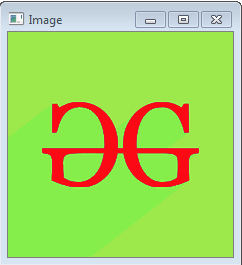
👁 HSV_output

Explanation:

  • cv2.cvtColor(src, cv2.COLOR_BGR2HSV): Converts BGR image to HSV color space.
  • cv2.imshow("HSV Image", hsv_image): Displays HSV image in a window titled "HSV Image".

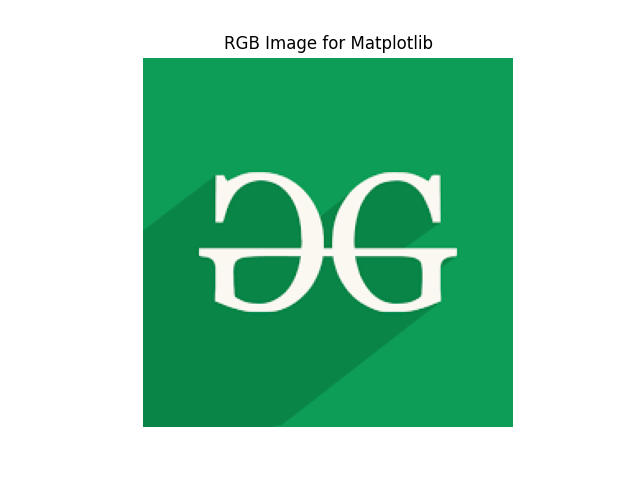
Example 3: Convert BGR to RGB (For Matplotlib)

This Python code reads an image using OpenCV, converts it from BGR to RGB color format and then displays it using Matplotlib.

Output

👁 rgbImage_output

Explanation:

  • cv2.cvtColor(src, cv2.COLOR_BGR2RGB): Converts image from BGR to RGB format for correct color display in Matplotlib.
  • plt.imshow(rgb_image): Displays the RGB image using Matplotlib.
  • plt.axis('off'): Hides the axis for a cleaner view.

Common Conversion Codes

Let’s see some of the most commonly used OpenCV color conversion codes:

  • cv2.COLOR_BGR2GRAY BGR: Grayscale
  • cv2.COLOR_BGR2RGB BGR: RGB
  • cv2.COLOR_BGR2HSV BGR: HSV
  • cv2.COLOR_BGR2LAB BGR: LAB color space
  • cv2.COLOR_BGR2YCrCb BGR: YCrCb (used in compression & skin detection)

Real-World Applications

Different color spaces are preferred for specific computer vision tasks because they highlight certain image features better. Let’s see some real-world applications of these conversions:

  • Grayscale: Face detection, OCR (text recognition)
  • HSV: Object tracking (e.g., detecting a colored ball)
  • LAB: Color enhancement, skin tone detection
  • YCrCb: Video compression, human skin detection
Comment