|
VOOZH | about |
|
VOOZH | about |
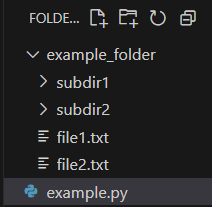
os.DirEntry.is_dir() method is used to determine whether a given entry retrieved using os.scandir()) is a directory. It returns True if the entry is a directory and False otherwise. This method is more efficient than manually checking with os.path.isdir() because it can use cached information from the operating system, reducing the number of system calls. We use the following folder structure in the example below:
Example:
Output
example_folder
Explanation: This code lists directories only in the current folder (.). It doesn’t show subdirectories because os.scandir() scans one level at a time; to include subdirectories, use recursion.
DirEntry.is_dir(*, follow_symlinks=True)
Parameters:follow_symlinks (optional) defaults to True. If set to False, symbolic links pointing to directories are not followed.
Returns: It returns True if the entry is a directory, False otherwise.
Let’s dive deeper into why we prefer is_dir() over os.path.isdir() based on its key features. Understanding these benefits helps write faster and cleaner directory-handling code.
Example 1: In this example, we are printing directories and their subdirectories by recursively scanning through them using the fun() function.
Output
.\example_folder
.\example_folder\subdir1
.\example_folder\subdir2
Explanation: fun() function looks inside a folder and checks each item to see if it is a directory (ignoring shortcuts). If it is, the function prints the folder’s path and then looks inside that folder too, repeating this process to find all folders inside folders.
Example 2: In this example, we use the os module to scan the current directory and print the names of all entries that are directories, including symbolic links that point to directories.
Output
example_folder
Explanation: os.scandir('.') scans the current directory and returns all entries. for e in d loops through each entry and e.is_dir(follow_symlinks=True) checks if it's a directory, including symlinks to directories.
When working with directories, some paths may be inaccessible due to missing folders or restricted permissions. To ensure your program doesn't crash, it's important to handle potential exceptions like PermissionError or FileNotFoundError using a try-except block for safe and reliable directory traversal.
Output
Not found!
Explanation: This code scans a directory to print its subdirectories using os.scandir(), handling errors safely with a try-except block. It catches PermissionError to print "Denied!" if access is blocked and FileNotFoundError to print "Not found!" if the directory doesn't exist.