|
VOOZH | about |
|
VOOZH | about |
The pop() method in Pandas is used to remove a column from a DataFrame and return it as a Series. This is similar in concept to the dictionary pop() method in Python, but specifically designed for use with Pandas DataFrames. It's key features include:
Example:
Output
Explanation: pop() removes the 'age' column and returns it as a Series. After the operation, a holds the age values and df retains only the name and city columns.
DataFrame.pop(label)
Parameters: label (str) is the name of the column to be removed.
Returns: A Series containing the removed column values.
Note: This method raises KeyError if the column does not exist in the DataFrame.
Example 1: This example shows that trying to pop a column which does not exist in the DataFrame will raise a KeyError.
Output
Traceback (most recent call last):
 File "...", line ...
 df.pop('quantity')
 File "...", line ...
 raise KeyError(key) from err
KeyError: 'quantity'
Explanation: Since the column 'quantity' does not exist in the DataFrame, calling pop('quantity') raises a KeyError.
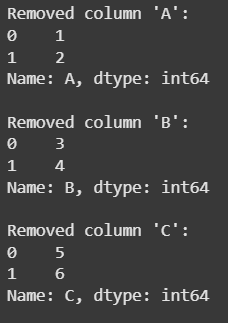
Example 2: This example shows how you can use pop() in a loop to remove and process columns until the DataFrame is empty.
Output
Explanation: Loop runs until the DataFrame is empty, removing the first column each time with pop(), which deletes it in-place and returns it as a Series. The column name and values are printed until all columns are processed.
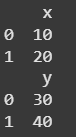
Example 3: This example demonstrates how to pop a column from one DataFrame and assign it to another DataFrame.
Output
Explanation: df1 is created with columns 'x' and 'y' and an empty df2 is initialized. The pop() method removes 'y' from df1 and assigns it to df2['y']. As a result, df1 contains only 'x' and df2 contains the original 'y' values.