|
VOOZH | about |
|
VOOZH | about |
DataFrame.sub() allows for element-wise subtraction between a DataFrame and another object, with added support for handling missing data. The DataFrame.sub() function is essentially equivalent to performing DataFrame - other, but with additional options to manage missing values in one of the inputs.
Syntax: DataFrame.sub(other, axis='columns', level=None, fill_value=None)
Parameters:
other: A Series, DataFrame, or constant to subtract from the DataFrame.axis: Specifies the axis to align the subtraction on. For a Series input, this determines whether to match the Series index to the DataFrame columns (axis=1) or the rows (axis=0).level: Broadcasts the operation across a level, aligning Index values in a MultiIndex DataFrame.fill_value: Fills missing (NaN) values in either of the inputs before computation. If corresponding values in both inputs are missing, the result will also be missing.The function returns a dataframe containing result of subtraction.
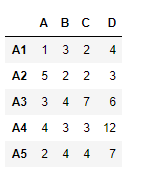
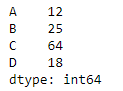
Let’s use the sub() function to subtract the elements of a Series from the corresponding elements in a DataFrame.
Let's create the series
👁 ImageLet's use the dataframe.sub() function for subtraction.
Output :
👁 ImageIn this example, we subtract the elements of one DataFrame from the corresponding elements in another DataFrame.
Output :
👁 Image
Notice that each element in df1 has been subtracted from the corresponding element in df2.