Pandas DataFrame is a two-dimensional size-mutable, potentially heterogeneous tabular data structure with labeled axes (rows and columns). Arithmetic operations align on both row and column labels. It can be thought of as a dict-like container for Series objects. This is the primary data structure of the Pandas.
Pandas
DataFrame.transform() function call func on self producing a DataFrame with transformed values and that has the same axis length as self.
Syntax: DataFrame.transform(func, axis=0, *args, **kwargs)
Parameter :
func : Function to use for transforming the data
axis : {0 or ‘index’, 1 or ‘columns’}, default 0
*args : Positional arguments to pass to func.
**kwargs : Keyword arguments to pass to func.
Returns : DataFrame
Example #1 : Use
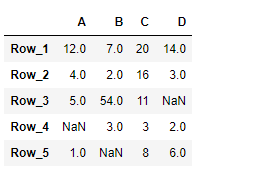
DataFrame.transform() function to add 10 to each element in the dataframe.
Output :
👁 Image
Now we will use
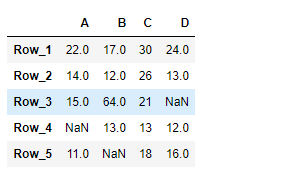
DataFrame.transform() function to add 10 to each element of the dataframe.
Output :
👁 Image
As we can see in the output, the
DataFrame.transform() function has successfully added 10 to each element of the given Dataframe.
Example #2 : Use
DataFrame.transform() function to find the square root and the result of euler's number raised to each element of the dataframe.
Output :
👁 Image
Now we will use
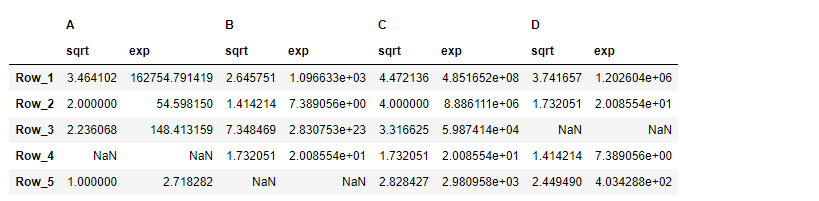
DataFrame.transform() function to find the square root and the result of euler's number raised to each element of the dataframe.
Output :
👁 Image
As we can see in the output, the
DataFrame.transform() function has successfully performed the desired operation on the given dataframe.