Python is a great language for doing data analysis, primarily because of the fantastic ecosystem of data-centric Python packages.
Pandas is one of those packages and makes importing and analyzing data much easier.
Pandas
str.len() method is used to determine length of each string in a Pandas series. This method is only for series of strings.
Since this is a string method,
.str has to be prefixed everytime before calling this method. Otherwise it will give an error.
Syntax: Series.str.len()
Return type: Series of integer values. NULL values might be present too depending upon caller series.
To download the CSV used in code, click
here.
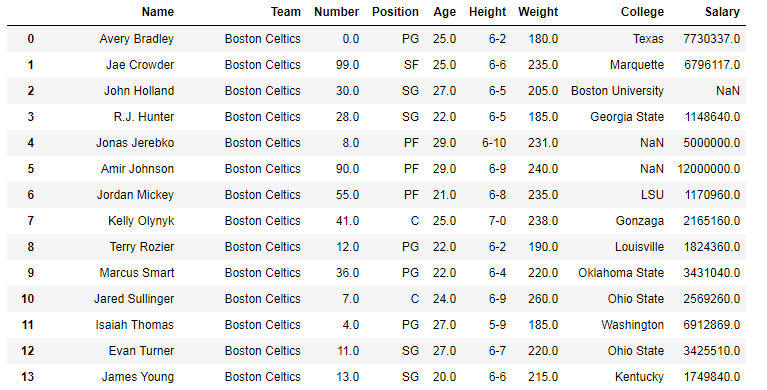
In the following examples, the data frame used contains data of some NBA players. The image of data frame before any operations is attached below.
👁 Image
Example #1: Calculating length of string series (dtype=str)
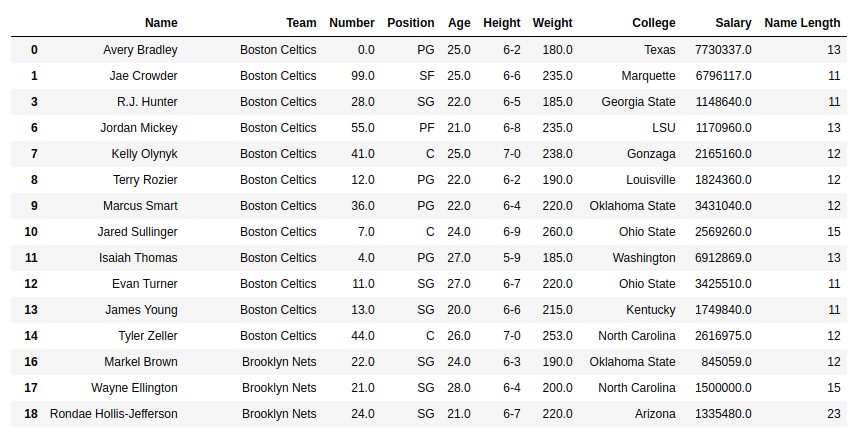
In this example, the string length of Name column is calculated using str.len() method. The dtype of the Series is already string. So there is no need of data type conversion. Before doing any operations, null rows are removed to avoid errors.
Output:
As shown in the output image, the length of each string in name column is returned.
👁 Image
Note:
- This method doesn't count length of integer or float series. It will give an error since it's not a string series. The series need to be converted first ( Shown in next Example)
- There is no parameter to handle null values. A null value would return null in the output string too.
Example #2:
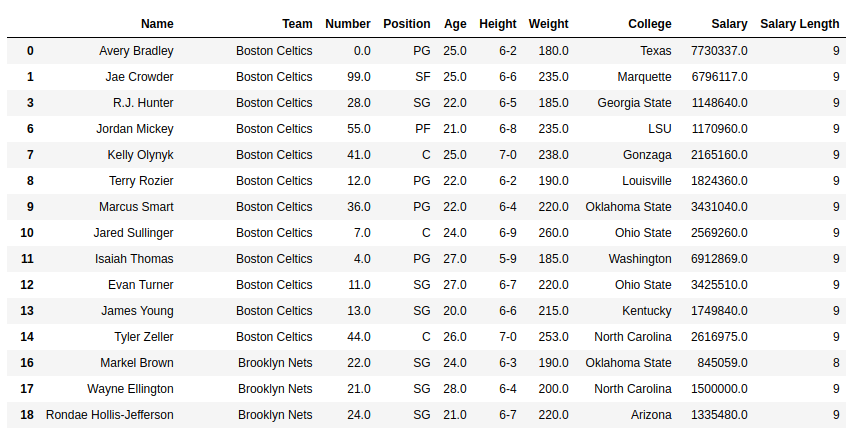
In this example, the length of salary column is calculated using the str.len() method. Since the series is imported as float64 dtype, it's first converted to string using .astype() method.