|
VOOZH | about |
|
VOOZH | about |
Web crawling is widely used technique to collect data from other websites. It works by visiting web pages, following links and gathering useful information like text, images, or tables. Python has various libraries and frameworks that support web crawling. In this article we will see about web crawling using Python.
The first step in web crawling is fetching the content of a webpage. The requests library allows us to send an HTTP request to a website and retrieve its HTML content. For this we will use requests module in python.
requests.get(URL) : Sends a GET request to the specified URL.response.status_code : Checks if the request was successful status code 200 means success.response.text : Contains the HTML content of the webpage.Output:
Sometimes websites provide data inJSON format which we need to convert into Python Dictionary. In this example a GET request is made to the location API using the `requests` library. If the request is successful indicated by a status code of 200 then ISS's current location data is fetched and printed. Otherwise an error message with the status code is displayed.
response.json() : Converts the JSON response into a Python dictionary.data['iss_position']['latitude'].Output:
You can also use web crawling to download images from websites. In this example a GET request is used to fetch an image from a given URL. If the request is successful the image data is saved to a local file named "gfg_logo.png". Otherwise a failure message is displayed.
response.content : Contains the binary content of the image.open(output_filename, "wb") : Opens a file in binary write mode to save the image.Output:
Image downloaded successfully as gfg_logo.png
We use Python to get the current temperature of Noida from a weather website. First we send a request to the website. Then we use XPath to find and show the temperature from the webpage. If it's found we print it otherwise we show an error message.
Output:
The current temperature is: 31
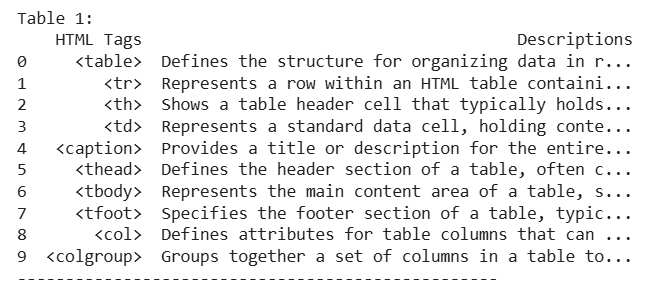
We can read tables on the web by using Pandas and web crawling. Pandas is used to extract tables from a specified URL using its read_html function. If tables are successfully extracted from the webpage they are printed one by one with a separator. If no tables are found a message indicating this is displayed.
Output:
We can also find most frequent words we crawl a web page using requests and then use BeautifulSoup to read the content. We focus on a specific part of the page called 'entry-content' and extract all the words from it. After cleaning the words, removing symbols and non-alphabetic characters we count how often each word appears. Finally we show the 10 most common words from that content.
Output:
Web crawling with Python provides an efficient way to collect and analyze data from the web. It is essential for various applications such as data mining, market research and content aggregation. With proper handling of ethical guidelines, web crawling becomes important for gathering data and insights from web.