|
VOOZH | about |
|
VOOZH | about |
To convert a dictionary of lists to a CSV file in Python, we need to transform the dictionary's structure into a tabular format that is suitable for CSV output. A dictionary of lists typically consists of keys that represent column names and corresponding lists that represent column data.
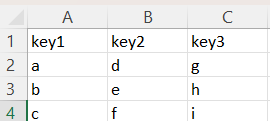
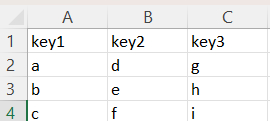
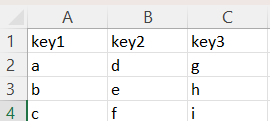
For example, given a dictionary with keys key1, key2, and key3 and values like ['a', 'b', 'c'], ['d', 'e', 'f'] and ['g', 'h', 'i'], the resulting CSV will have key1, key2, and key3 as headers and the lists as rows under these headers, making the data easy to process in a tabular format.
Pandas is especially useful when dealing with large datasets due to its optimized handling of data structures and efficient writing to CSV. It can automatically handle various data types, offering simplicity and speed for converting a dictionary of lists into a CSV format.
Output
Explanation:
Table of Content
csv.DictWriter class from Python’s built-in csv module provides a direct way to handle dictionaries and allows us to write data to CSV in a structured manner. This method is efficient for moderately sized datasets and works well when we want to interact with dictionaries directly without needing an external library like Pandas.
Output:
Explanation:
This approach uses Python's built-in csv.writer class in combination with the zip function. zip () transposes the dictionary values into rows, making it easy to write them to a CSV file. It is a straightforward method for smaller datasets and doesn’t require any additional libraries or complex operations.
Output:
Explanation:
This method involves first converting the dictionary to a JSON format and then exporting it to a CSV. While not the most efficient for large datasets, it is flexible and can be useful when we want to perform additional operations on the data in JSON format before converting it to CSV.
Output:
Explanation: