|
VOOZH | about |
|
VOOZH | about |
Openpyxl is a Python library for reading and writing Excel (with extension xlsx/xlsm/xltx/xltm) files. The Openpyxl Module allows Python programs to read and modify Excel files. For example, users might have to go through thousands of rows and pick out a few handfuls of information to make small changes based on some criteria. Using Openpyxl module, these tasks can be done very efficiently and easily.
Use this command to install openpyxl module
pip install openpyxl
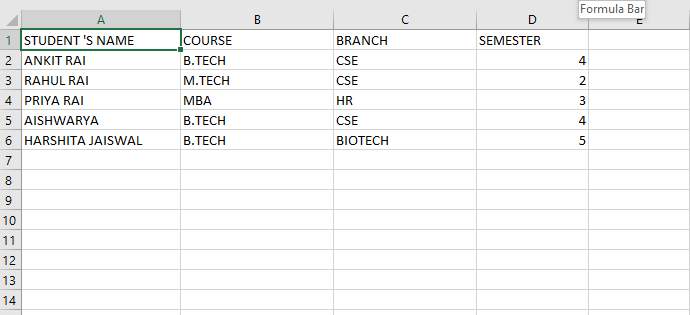
Let’s assume your Excel file contains student records in the following format:
👁 ImageYou can fetch a specific cell's value using its row and column index.
Output:
STUDENT 'S NAME
Explanation:
To determine how many rows your sheet contains, use max_row. This is useful for iterating through entire datasets.
Output
6
Explanation: max_row returns the total number of rows with data in the sheet.
You can use max_column to find out the number of columns. This helps when reading header fields or iterating over columns.
Output
4
Explanation : max_column gives the count of the rightmost column that contains data.
This example prints all column titles (first row values). It helps when you want to inspect or label your data columns.
Output
STUDENT 'S NAME
COURSE
BRANCH
SEMESTER
Explanation:
To list all entries from the first column (e.g., student names). Use max_row to iterate through all rows in column 1.
Output:
STUDENT 'S NAME
ANKIT RAI
RAHUL RAI
PRIYA RAI
AISHWARYA
HARSHITA JAISWAL
Explanation:
To print all values from a specific row, such as the 2nd. This is helpful when you want to extract a full record.
Output:
ANKIT RAI B.TECH CSE 4
Explanation: