|
VOOZH | about |
|
VOOZH | about |
Tkinter is a GUI (Graphical User Interface) module which comes along with the Python itself. This module is widely used to create GUI applications. tkinter.ttk is used to create the GUI applications with the effects of modern graphics which cannot be achieved using only tkinter. Checkbutton is used to select multiple options. Checkbuttons can be created using following snippet.
Note
Tkinter.Checkbutton: This widget was used to create a checkbutton, but it has been replaced by
the tkinter.Checkbutton() widget, which provides more options and better support for different
checkbutton styles.
chkbtn = ttk.Checkbutton(master, option=value, ...)
Code #1:
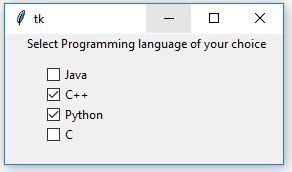
Output:
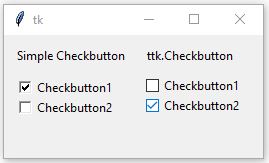
Code #2: Difference between simple Checkbutton and ttk.Checkbutton
Output: 👁 Image
Notice the difference in the appearance of both the Checkbuttons which is all due to the modern graphics. In the above Code when mouse is being hovered over the ttk.Checkbutton you may see a blue color effect (effect may change from os from os). When we hover mouse over Simple Checkbutton you may not experience any such kind of effects.