|
VOOZH | about |
|
VOOZH | about |
Unit testing is an essential practice in Python software development. It involves testing small, isolated pieces of code, called “units,” to ensure they function correctly. By catching errors early, unit testing enhances code quality, reduces bugs in production and makes programs more reliable and maintainable.
Key points:
Python has several frameworks to help write and run unit tests efficiently:
Before using frameworks, it’s important to understand assert statement.
The assert statement is used to verify that a condition holds true in your code. If the condition is false, it raises an AssertionError, helping catch bugs early by validating assumptions during development.
assert condition, message
Explanation: x > 0 is the condition while, "x must be positive" is the message.
unittest is Python’s built-in framework for writing and running tests. It helps you verify that your code behaves as expected by organizing tests into reusable test cases. To use it, start by importing library:
import unittest
Example: This example shows how to create a unit test using the unittest framework. It defines a test class with a method that checks correctness of a calculation.
Output
----------------------------------------------------------------------
Ran 1 test in 0....
Explanation:
pytest is a Python testing framework that makes writing and running tests simpler and more flexible. It can run existing unittest test cases while offering additional benefits such as:
To install pytest, run following command in your terminal or command prompt:
pip install pytest
Example: Let's start with a simple example. Here, we will make a file named as math_functions.py containing functions to add and subtract two numbers.
Now, we will make another file named as test_math_functions.py. We are making this file to perform testing using pytest using sample inputs.
To run these tests using pytest, navigate to directory containing these files in your terminal and run:
pytest
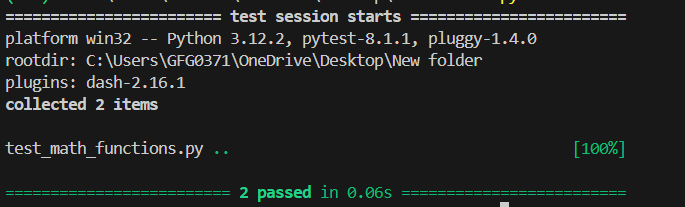
Output
Explanation:
Nose is a testing framework test runner that extends capabilities of Python's built-in unittest module. It provides a simpler syntax for writing tests and offers additional features for test discovery, parallel test execution and plugin support.
To install Nose use below command in command prompt:
pip install nose
Example: Let’s see how to perform simple unit tests using Nose. We will create a file named main.py with test functions to check basic addition and subtraction.
To run this program, we will write following command:
nosetests main.py
Output
Explanation:
Doctest Module is used to write tests in form of interactive Python sessions within docstrings and then automatically run those tests to verify that code behaves as expected. Doctest Module finds patterns in docstring that looks like interactive shell commands.
Example: Let’s create a file named main.py and write doctest-based tests directly in the function docstrings. These examples will automatically check if the functions work correctly.
To run the program, write following command in terminal in same directory as main.py file.
python -m doctest main.py
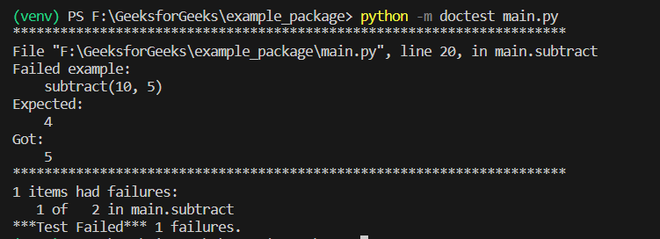
Output
Explanation:
unittest module provides many assertion methods to check values, types and existence of variables. Below are some of the methods that are commonly used to write assertions.
Method | Description |
|---|---|
.assertEqual(a, b) | Checks if a == b |
.assertTrue(x) | Checks if x is True |
.assertIsInstance(a, b) | Checks if a is an instance of class b |
.assertIsNone(x) | Checks if x is None |
.assertFalse(x) | Checks if x is False |
.assertIs(a, b) | Checks if a is b |
.assertIn(a, b) | Checks if a is a member of b |
.assertRaises(Exception) | Checks if a block of code raises an exception |
In real-world projects, you often need to test more than just basic cases. Advanced testing techniques help ensure your code works correctly in different situations. Key concepts include:
Example: This demonstrates how to write unit tests using unittest, including handling bad data types. We test normal numeric inputs as well as cases where an invalid type should raise a TypeError.
Output
----------------------------------------------------------------------
Ran 2 tests in 0.001s
Explanation: