|
VOOZH | about |
|
VOOZH | about |
Web scraping is the process of extracting data from websites automatically. Python is widely used for web scraping because of its easy syntax and powerful libraries like BeautifulSoup, Scrapy and Selenium. In this tutorial, you'll learn how to use these Python tools to scrape data from websites and understand why Python 3 is a popular choice for web scraping tasks.
The requests library is used for making HTTP requests to a specific URL and returns the response. Python requests provide inbuilt functionalities for managing both the request and response.
If requests is not installed, install it using:
pip install requests
Example: In this example, we are sending a GET request to a webpage using the requests.get() method, then printing the response status code and the page content returned by the server.
Output
Explanation:
For more information, refer to our Python Requests Tutorial.
Once the raw HTML is fetched, the next step is to parse it into a readable structure. That’s where BeautifulSoup comes in. It helps convert the raw HTML into a searchable tree of elements.
If requests is not installed, install it using:
pip install beautifulsoup4
Example: Here, we first send an HTTP request to the webpage, then use BeautifulSoup to parse the HTML content and format it in a clean, readable structure.
Output
Explanation:
At this point, the HTML is ready to be searched for tags, classes or content.
Once we have parsed the HTML using BeautifulSoup, the next step is to locate and extract specific content from the page. Websites usually wrap their main article content inside tags with identifiable classes like <div class="article--viewer_content">. We can target such elements and pull out useful data like text, links or images.
Example: In this example, we'll extract all paragraph (<p>) text from the main content section of the GeeksforGeeks Python Tutorial page.
Output
Image of the actual GeeksforGeeks Python Tutorial page:
Notice that the text output in the terminal contains the actual content from the web page.
For more information, refer to our Python BeautifulSoup.
Some websites load their content dynamically using JavaScript. This means the data you're trying to scrape may not be present in the initial HTML source. In such cases, BeautifulSoup alone won’t work, because it only reads static HTML.
To handle this, we use Selenium that can automate browsers like Chrome or Firefox, wait for content to load, click buttons, scroll and extract fully rendered web pages just like a real user.
If selenium is not installed, install it using:
pip install selenium
A WebDriver is a software component that Selenium uses to interact with a web browser. It acts as the bridge between your Python script and the actual browser window.
Each browser (Chrome, Firefox, Edge, etc.) has its own WebDriver:
Selenium uses this WebDriver to:
Note: You can either manually download the WebDriver or use webdriver-manager which handles the download and setup automatically.
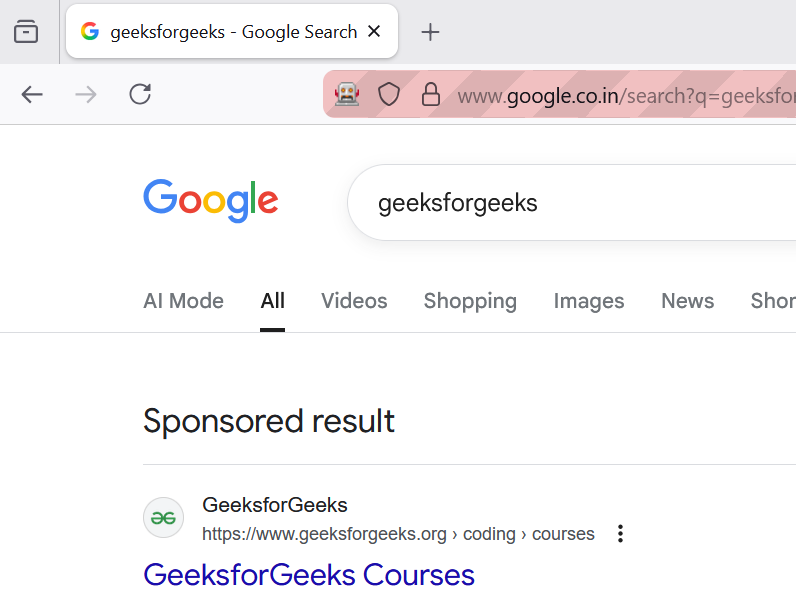
Example 1: In this example, we're directing the browser to the Google search page with the query parameter "geeksforgeeks". The browser will load this page and we can then proceed to interact with it programmatically using Selenium. This interaction could involve tasks like extracting search results, clicking on links or scraping specific content from the page.
Output
Explanation:
Example 2: In this example, we automate a real e-commerce test website using Selenium and Chrome. The script opens each page, extracts laptop details such as title, price, description, and ratings, and stores everything in a structured list for further use.
Output
Explanation:
For more information, refer to our Python Selenium.
The lxml library is a fast, powerful HTML/XML parser that supports XPath, making it ideal when you need accurate and targeted extraction from webpages. It helps convert raw HTML into a structured tree so you can fetch elements precisely much faster and more flexible than basic HTML parsing.
If lxml is not installed, install it using:
pip install lxml
Example: In this example, we fetch a webpage using requests, parse the HTML using lxml.html, and use XPath to extract all link texts from <a> tags.
Output
Learn more
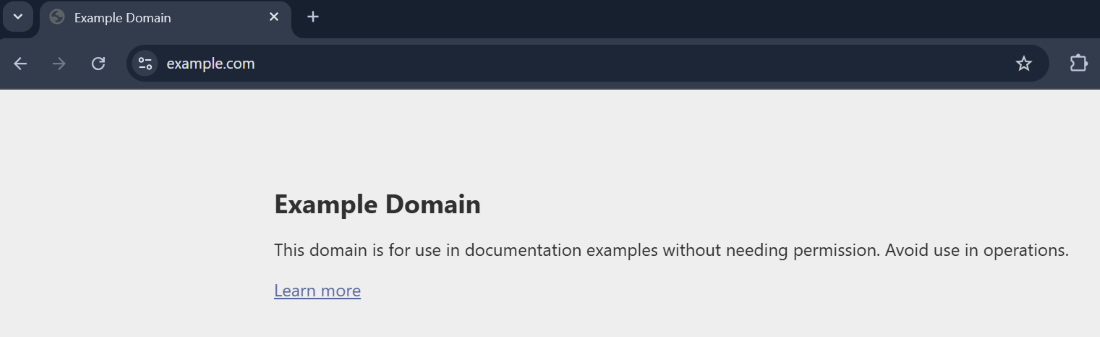
Below is the snapshot of the actual webpage of the URL: 'https://example.com/'
Explanation:
For more information, refer to our lxml
The urllib module is a built-in Python library used for working with URLs. It helps you open web pages, read their data, parse URLs, and handle URL-related errors. It groups several useful submodules such as urllib.request, urllib.parse, urllib.error, and urllib.robotparser, making it easy to fetch and process online content.
If urllib is missing in your environment, install:
pip install urllib3
Example: In this example, we open a webpage using urlopen(), read its HTML content, decode it into text and then print it.
Output
Explanation:
For more information, refer to urllib module
PyAutoGUI allows you to automate on-screen mouse and keyboard actions. It is especially useful when Selenium cannot interact with certain elements like native pop-ups, custom menus or non-HTML components.
If PyAutoGUI is not installed, install it using:
pip install pyautogui
Example: In this example, PyAutoGUI moves the mouse to specific screen positions and performs clicks, helping automate simple UI interactions.
Output
Explanation:
For more information, refer to PyAutoGUI
The schedule module allows you to run functions automatically at fixed time intervals. It is especially useful in web scraping when you want to collect data every few minutes, hourly, daily, or weekly without manually running the script each time.
If schedule is not installed, install it using:
pip install schedule
Example: In this example, we schedule a simple function to run every minute. The loop keeps checking for pending jobs and executes them at the right time.
Output
Explanation:
Python 3 is the most modern and supported version of Python and it's ideal for web scraping because: