|
VOOZH | about |
|
VOOZH | about |
read_sql_table() is a Pandas function used to load an entire SQL database table into a Pandas DataFrame using SQLAlchemy. It allows you to access table data in Python by providing only the table name and database connection, without writing any SQL query.
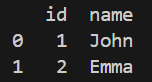
Example: This example creates a small SQLite database, inserts data into a table and then reads that table into a Pandas DataFrame.
Output
Explanation:
pd.read_sql_table(table_name, con, schema=None, index_col=None, coerce_float=True, parse_dates=None, columns=None, chunksize=None)
Parameters:
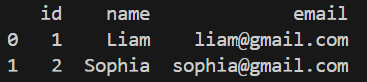
Example 1: This program creates a contacts table, inserts two records, and loads the table into a Pandas DataFrame.
Output:
Explanation: pd.read_sql_table("contacts", db) loads all rows from the contacts table into the DataFrame df.
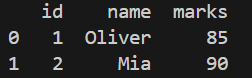
Example 2: This program stores student records in a database and reads them into a DataFrame.
Output:
Explanation: pd.read_sql_table("students", db) reads the full students table and stores it in df.
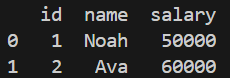
Example 3: This example creates an employee table and retrieves it using read_sql_table().
Output:
Explanation: pd.read_sql_table("employee", db) fetches the entire employee table and stores it in df.