|
VOOZH | about |
|
VOOZH | about |
In this article, we will discuss how to rename columns for PySpark dataframe aggregates using Pyspark.
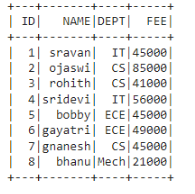
Dataframe in use:
👁 ImageIn PySpark, groupBy() is used to collect the identical data into groups on the PySpark DataFrame and perform aggregate functions on the grouped data. These are available in functions module:
We can use this method to change the column name which is aggregated.
Syntax:
dataframe.groupBy('column_name_group').agg(aggregate_function('column_name').alias("new_column_name"))
where,
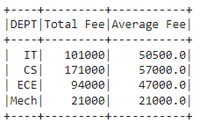
Example 1: Aggregating DEPT column with sum() and avg() by changing FEE column name to Total Fee
Output:
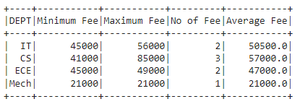
👁 ImageExample 2 : Aggregating DEPT column with min(),count(),mean() and max() by changing FEE column name to Total Fee
Output:
👁 ImageThis takes a resultant aggregated column name and renames this column. After aggregation, It will return the column names as aggregate_operation(old_column)
so using this we can replace this with our new column
Syntax:
dataframe.groupBy("column_name_group").agg({"column_name":"aggregate_operation"}).withColumnRenamed("aggregate_operation(column_name)", "new_column_name")
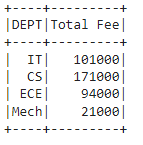
Example: Aggregating DEPT column with sum() FEE and rename to Total Fee