|
VOOZH | about |
|
VOOZH | about |
UploadFile is a class provided by FastAPI to handle file uploads efficiently. It allows to receive uploaded files as function parameters in API endpoints. UploadFile class has the following attributes for getting information about the file submitted by the user:
"/upload/" endpoint is defined to handle file uploads. An HTML form sends the file to this endpoint, where it is received as an UploadFile object.
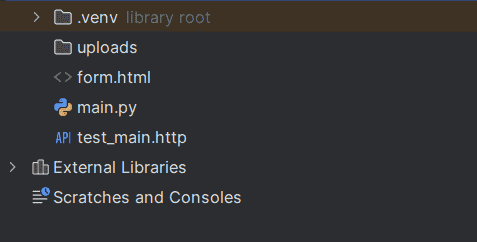
The directory structure should look like this:
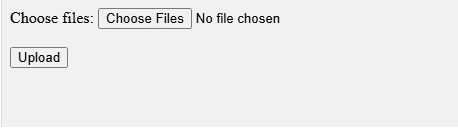
form.html is a HTML form that allows users to select a file and submit it to the /upload/ endpoint on localhost.
Form data without files uses application/x-www-form-urlencoded, while file uploads use multipart/form-data. To handle file inputs, install python-multipart using the following pip command.
pip install python-multipart
In app.py, we import FastAPI and UploadFile, create a FastAPI app instance, define a POST/upload/endpoint and implement an async function that handles the uploaded file.
Explanation:
Now to be able to access the /upload endpoint we need to use uvicorn. Run below commmand in the terminal:
python -m uvicorn app:app --reload
The command specifies the file name and FastAPI instance (app:app). The --reload flag restarts the server automatically on code changes. It runs the server locally at:
http://127.0.0.1:8000/
Now open the form.html file in the browser and select a file to save and submit it. The file will be stored on the server at the path specified in the code.
To handle multiple file uploads, update the endpoint to accept list[UploadFile]. This allows all uploaded files to be received and processed as a list. Change the Above HTML code to take multiple file inputs:
In app.py, the function accepts list[UploadFile] to handle multiple files, then iterates through each file and saves it on the server
Explanation:
Now to be able to access the /upload endpoint we need to use uvicorn. Run below commmand in the terminal:
python -m uvicorn app:app --reload
In the above image from the interface, select the file and click the upload button. This action redirects to the /upload endpoint and returns a response {"message": "File uploaded successfully"}. The file is then stored on the local server.